Showing posts with label Dotnet. Show all posts

Sunday, 6 October 2024

Clean Architecture

What is Clean Architecture?

Clean Architecture is a design pattern that separates an application into different layers based on their responsibility.  It’s a way of organizing your code into independent, testable, and reusable components. 

It isolates the business logic of the application from external details such as user interfaces, databases, and frameworks.

The primary objective of Clean Architecture is to create a structure that makes it easy to manage and maintain an application as it grows and changes over time. It also makes it easy to add new features, fix bugs, and make changes to existing functionality without affecting the rest of the application.

Implementing Clean Architecture in ASP .NET Core Web API

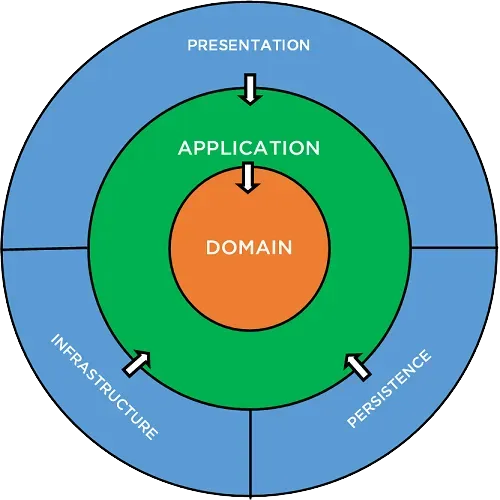
To apply Clean Architecture, we can divide the application into four primary layers:

Domain Layer – The domain layer represents the application’s core business rules and entities. This is the innermost layer and should not have any external dependencies. It contains domain entities, value objects, and domain services.

Application Layer – The application layer sits just outside the domain layer and acts as an intermediary between the domain layer and other layers. In other words, it contains the use cases of the application and we expose the core business rules of the domain layer through the application layer. This layer depends just on the domain layer.

Infrastructure Layer – We implement all the external services like databases, file storage, emails, etc. in the infrastructure layer. It contains the implementations of the interfaces defined in the domain layer.

Presentation Layer – The presentation layer handles the user interactions and fetches data to the user interface. It contains the user interface components (e.g., MVC, API Controllers, Blazor components).

With Clean Architecture, the Domain and Application layers are at the center of the design. This is known as the Core of the system.

The Domain layer contains enterprise logic and types and the Application layer contains business logic and types. The difference is that enterprise logic could be shared across many systems, whereas the business logic will typically only be used within this system.

Implementing the Project Structure:

Creating the Core Layer:

  1. Define Entities and Use Cases.
  2. Create a folder named “Core.”
  3. Within this folder, classes for Entities such as “User.cs” or “Product.cs” are created.
  4. Create interfaces or abstract classes for Use Cases like “IUserService.cs”.

Creating the Application Layer:

  1. Implement Use Cases.
  2. Create a folder named “Application.”
  3. Implement Use Cases as classes that inherit from the interfaces defined in the Core layer.
  4. For example: “UserService.cs”.

Creating the Infrastructure Layer:

  1. Implement Interface Adapters.
  2. Create a folder named “Infrastructure.”
  3. Implement concrete classes for the interfaces defined in the Core layer.
  4. For example: “UserRepository.cs” for “IUserRepository”.

Project Structure


Benefits of Clean Architecture:

Maintainability: Easier to modify and extend the system.

Flexibility: Adapts to changing requirements with minimal impact on other components.

Scalability: Better suited for large, complex systems.

Reference

https://code-maze.com/ , 

https://positiwise.com/

https://www.macrix.eu/ ,

https://medium.com/


Continue Reading →

Saturday, 26 September 2020

What Is Load Balancing

 What Is Load Balancing?

Load balancing is the process of distributing network traffic across multiple servers. This ensures no single server bears too much demand. By spreading the work evenly, load balancing improves application responsiveness. It also increases availability of applications and websites for users. Modern applications cannot run without load balancers.

A load balancer acts as the “traffic cop” sitting in front of your servers and routing client requests across all servers capable of fulfilling those requests in a manner that maximizes speed and capacity utilization and ensures that no one server is overworked, which could degrade performance. If a single server goes down, the load balancer redirects traffic to the remaining online servers. When a new server is added to the server group, the load balancer automatically starts to send requests to it.

In this manner, a load balancer performs the following functions:

  1. Distributes client requests or network load efficiently across multiple servers
  2. Ensures high availability and reliability by sending requests only to servers that are online
  3. Provides the flexibility to add or subtract servers as demand dictates
Question: There is a website run by 2 servers. These 2 servers balances the load using Load Balancer. So, if 1 session is created on 1 server and say load is shift to another server immediately, then how session is maintained?

This is where the concept of "Sticky Sessions" or "Session Affinity" comes into play.

Sticky Sessions: By default, a Classic Load Balancer routes each request independently to the registered instance with the smallest load. However, you can use the sticky session feature (also known as session affinity), which enables the load balancer to bind a user's session to a specific instance. This ensures that all requests from the user during the session are sent to the same instance. Read more

In .Net there are two concepts called StateServer or SQLServer which are the recommendations to get the session information out of the execution process in the servers, so that's the idea, isolate the sessions in a different server or process, you can read a little bit here:

Continue Reading →

Thursday, 13 December 2018

ASP.NET MVC extensibility points

13 ASP.NET MVC extensibility points you must know

One of the main design principles ASP.NET MVC has been designed with is extensibility. Everything (or most of) in the processing pipeline is replaceable so, if you don’t like the conventions (or lack of them) that ASP.NET MVC uses, you can create your own services to support your conventions and inject them into the main pipeline.

In this post I’m going to show 13 extensibility points that every ASP.NET MVC developer should know, starting from the beginning of the pipeline and going forward till the rendering of the view.

1. RouteConstraint
Usually you could put some constrains on url parameters using regular expressions, but if your constrains depend on something that is not only about the single parameter, you can implement the IRouteConstrains’s method and put your validation logic in it.

One example of this is the validation of a date: imagine an url that has year, month and date on different url tokens, and you want to be able to validate that the three parts make a valid date.
Link 1Link 2

2. RouteHandler
Not really specific to ASP.NET MVC, the RouteHandler is the component that decide what to do after the route has been selected. Obviously if you change the RouteHandler you end up handling the request without ASP.NET MVC, but this can be useful if you want to handle a route directly with some specific HttpHanlders or even with a classic WebForm.
ReadMore: IRoutehandler asp.net mvc

3. ControllerFactory
The controller factory is the component that, based on the route, chooses which controller to instantiate and instantiate it. The default factory looks for anything that implements IController and whose name ends with Controller, and than create an instance of it through reflection, using the parameter-less constructor.

But if you want to use Dependency Injection you cannot use it, and you have to use a IoC aware controller factory: there are already controller factory for most of the IoC containers. You can find them in MvcContrib or having a look at the Ninject Controller Factory.

4. ActionInvoker
ActionInvoker is responsible for invoking the action based on it’s name. The default action invoker looks for the action based on the method name, the action name and possibly other selector attributes. Then it invokes the action method together with any filter defined  and finally it executes the action result.

If you read carefully you probably understood that most of the execution pipeline is inside the logic of the default ControllerActionInvoker class. So if you want to change any of these conventions, from the action method’s selection logic, to the way http parameters are mapped to action parameters, to the way filters are chosen and executed, you have to extend that class and override the method you want to change.

A good example of this, is the NinjectActionInvoker I developed to allow injection of dependencies inside filters.

5. ActionMethodSelectorAttribute
Actions, with the default action invoker, are selected based on their name, but you can finer tune the selection of actions implementing your own Method Selector. The framework already comes with the AcceptVerbs attribute that allows you to specify to which HTTP Verb an action has to respond to.

A possible scenario for a custom selector attribute is if you want to choose one action or another based on languages supported by the browser or based on the type of browser, for example whether it is a mobile browser or a desktop browser.

6. AuthorizationFilter
These kind of filters are executed before the action is executed, and their role is to make sure the request is “valid”.

There are already a few Authorization filters inside the framework, the most “famous” of which is the Authorize attribute that checks whether the current user is allowed to execute the action. Another is the the ValidateAntiForgeryToken that prevents CSRF attacks. If you want to implement your own authorization schema, the interface you have to implement is IAuthorizationFilter. An example could be the hour of the day.

7. ActionFilter
Action Filters are executed before and after an action is executed. One of the core filters is the OutputCache filter, but you can find many other usages for this filter. This is the most likely extension point you are going to use, as, IMHO, it’s critical to a good componentization of views: the controller only has to do its main stuff, and all the other data needed by the view must be retrieved from inside action filters.

8. ModelBinder
The default model binder maps HTTP parameters to action method parameters using their names: a http parameter named user.address.city will be mapped to the City property of the Address object that itself is a property of the method parameter named user. The DefaultModelBinder works also with arrays, and other list types.

But it can be pushed even further: for example you might use it to convert the id of the person directly to the Person object looking up on the database. This approach is explained better in the following post Timothy Khouri (aka SingingEels): Model Binders in ASP.NET MVC. The code is based on the preview 5, but the concept remains the same.

9. ControllerBase
All controllers inherit from the base class Controller. A good way to encapsulate logic or conventions inside your actions is to create you own layer supertype and have all your controllers to inherit from it.

10. ResultFilter
Like the ActionFiters, the ResultFilters are execute before and after the ActionResult is executed. Again, the OutputCache filter is an example of a ResultFilter. The usual example that is done to explain this filter is logging. If you want to log that a page has been returned to the user, you can write a custom RenderFilter that logs after the ActionResult has been executed.

11. ActionResult
ASP.NET MVC comes with many different kind of results to render views, to render JSON, plain text, files and to redirect to other actions. But if you need some different kind of result you can write your own ActionResult and implement the ExecuteResult method. For example, if you want to send a PDF file as result you could write your own ActionResult that use a PDF library to generate the PDF. Another possible scenario is the RSS feed: read more about how to write a RssResult in this post.

Look at implementing a custom action result when the only peculiarity is how the result is returned to the user.

12. ViewEngine
Probably you are not going to write your own view engine, but there are a few that you might consider using instead of the default WebForm view engine. The most interesting one, IMHO, is Spark.

But if you really want to write your own view engine, have a look at this post by Brad Wilson: Partial Rendering & View Engines in ASP.NET MVC

13. HtmlHelper
Views must be very dumb and thin, and they should only have html markup and calls to HtmlHelpers. There should be no code inside the views, so helpers come very handy for extracting the code from the view and putting it into something that is testable. As Rob Conery says: “If there's an IF, make a Helper”.

What is an HtmlHelper? Basically it’s just an extension method of the HtmlHelper class, but that’s the only requirement.

You can read more about how HtmlHelpers are a great way to encapsulate code for view on Rob’s post: Avoiding Tag Soup.


Continue Reading →

Sunday, 23 September 2018

Introduction To Design Pattern

Design patterns represent the best practices used by experienced object-oriented software developers. Design patterns are solutions to general problems that software developers faced during software development. 
Design pattern are evolved over a period of time by experienced software developers. They promote re usability which leads to a more robust and maintainable code. 
The Design patterns can be classified into three main categories: 
  1. Creational Patterns
  2. Structural Patterns
  3. Behavioral Patterns
Creational Patterns- Creational design patterns are related to the way of creating objects. Creational design patterns are used when a decision is made at the time of instantiation of a class.  
  • Factory method/Template
  • Singleton
  • Abstract Factory
  • Builder
  • Prototype
Structural Patterns- Structural design patterns are concerned with how classes and objects can be composed, to form larger structures.
 The structural design patterns simplifies the structure by identifying the relationships.
These patterns focus on, how the classes inherit from each other and how they are composed from other classes.
  • Adapter
  • Proxy
  • Bridge
  • Filter
  • Composite
  • Decorator
  • Façade
  • Flyweight
Behavioral Patterns- Behavioral patterns are concerned with the assignment of responsibilities between objects, or, encapsulating behavior in an object and delegating requests to it.
Unlike the Creational and Structural patterns, which deal with the instantiation process and the blueprint of objects and classes, the central idea here is to concentrate on the way objects are interconnected. In a word, we can say this: If Creational is about instantiation, and Structural is the blueprint, then Behavioral is the pattern of the relationship among objects.
  • Interpreter
  • Strategy pattern
  • Template method/ pattern
  • Chain of responsibility
  • Command pattern
  • Iterator pattern
  • Visitor pattern
What Is Factory Pattern?
Factory it's such a Design Pattern which defines an interface for creating an object, but lets the classes that implement the interface decide which class to instantiate. Factory Pattern lets a class postpone instantiation to sub-classes. For more info. clink on the link  http://softmindit.blogspot.com/Link 1

What is Singleton Pattern
Singleton pattern is a creational pattern which allows only one instance of a class to be created which will be available to the whole application. The major advantage of Singleton design pattern is its saves memory because the single instance is reused again and again; there is no need to create a new object at each request. For example, in our application, we can use a single database connection shared by multiple objects, instead of creating a database connection for every request.

What are the drawbacks of using singleton design pattern?
The major drawbacks of using singleton design pattern are:
a)Singleton causes code to be tightly coupled. The singleton object is exposed globally and is available to a whole application. Thus, classes using this object become tightly coupled; any change in the global object will impact all other classes using it.
b)Singleton Pattern does not support inheritance.

Adapter: is a structural design pattern This allows incompatible classes to work together by converting the interface of one class into another.  
 If you have two applications, with one spitting out output as XML with the other requiring JSON input, then you’ll need an adapter between the two to make them work seamlessly.

Proxy: is a structural design pattern that provides an object that acts as a substitute for a real service object used by a client. A proxy receives client requests, does some work (access control, caching, etc.) and then passes the request to a service object. Click here for more

What Is Strategy Pattern?
In Strategy pattern, a class behavior or its algorithm can be changed at run time. This type of design pattern comes under behavior pattern.
In Strategy pattern, we create objects which represent various strategies and a context object whose behavior varies as per its strategy object. The strategy object changes the executing algorithm of the context object.
Real-World Analogy: Imagine that you have to get to the airport. You can catch a bus, order a cab, or get on your bicycle. These are your transportation strategies. You can pick one of the strategies depending on factors such as budget or time constraints. LINK 1Link 2

Intercepting Filter Pattern: The intercepting filter design pattern is used when we want to do some pre-processing / post-processing with request or response of the application. Filters are defined and applied on the request before passing the request to actual target application. Filters can do the authentication/ authorization/ logging or tracking of request and then pass the requests to corresponding handlers. Following are the entities of this type of design pattern.

Observer PatternThis pattern is a one-to-many dependency between objects so that when one object changes state, all its dependents are notified.
 For the sake of simplicity, think about what happens when you follow someone on Twitter. You are essentially asking Twitter to send you (the observer) tweet updates of the person (the subject) you followed. The pattern consists of two actors, the observer who is interested in the updates and the subject who generates the updates.
 A subject can have many observers and is a one to many relationship. However, an observer is free to subscribe to updates from other subjects too. You can subscribe to news feed from a Facebook page, which would be the subject and whenever the page has a new post, the subscriber would see the new post.


MVC Pattern: MVC Pattern stands for Model-View-Controller Pattern. This pattern is used to separate application's concerns.
For more design patter under the link Click here
Continue Reading →

Wednesday, 22 February 2017

Singleton Design Pattern

What is singleton pattern?
The singleton pattern is one of the simplest design patterns:
There are only two points in the definition of a singleton design pattern,
  1. There should be only one instance allowed for a class and
  2. We should allow global point of access to that single instance.
This structural code demonstrates the Singleton pattern which assures only a single instance
(the singleton) of the class can be created.

using System;

namespace ConsoleApp1
{
    /// <summary>  
    /// MainApp startup class for Structural  
    /// Singleton Design Pattern.  
    /// </summary>  
    class MainApp
    {
        /// <summary>  
        /// Entry point into console application.  
        /// </summary>  
        static void Main()
        {
            // Constructor is protected -- cannot use new  
            Singleton s1 = Singleton.Instance();
            Singleton s2 = Singleton.Instance();
            // Test for same instance  
            if (s1 == s2)
            {
                Console.WriteLine("Objects are the same instance");
            }
            // Wait for user  
            Console.ReadKey();
        }
    }

    /// <summary>  
    /// The Thread safe 'Singleton' class  
    /// </summary>  
    class Singleton
    {
        // Holds the single instance of the class.
        private static Singleton _instance;

        //Ensures that only one thread can enter the critical section at a time.
        private static readonly object _lock = new object();

        // Constructor is 'protected'  
        protected Singleton()
        {
        }
        public static Singleton Instance()
        {
            // First check (without locking) for performance
            if (_instance == null)
            {
                lock (_lock)
                {
                    // Second check (with locking) to ensure only one instance is created
                    if (_instance == null)
                    {
                        _instance = new Singleton();
                    }
                }
            }
            return _instance;
        }
    }
}

When to use Singleton classes
A very simple example is say Logger, suppose we need to implement the logger and log it to some file according to date time. In this case, we cannot have more than one instances of Logger in the application otherwise the file in which we need to log will be created with every instance.
We use Singleton pattern for this and instantiate the logger when the first request hits or when the server is started.

Here is how it looks:
public class Singleton {

// Holds the single instance of the class.
    private static Singleton instance;   
  
// Private constructor to Prevents external instantiation.
    private Singleton(){}
  
    public static Singleton getInstance() {
      if (instance == null)
        instance = new Singleton();
      return instance;
    }
  }

As you can see, the constructor is private, so we are unable instantiate it in the normal fashion. What you have to do is call it like this:
public Singleton singleton = Singleton.getInstance();

When you do this, the getInstance() method then checks to see if the parameter ‘instance’ is null. If it is, it will create a new one by calling the private constructor. After that, it just returns it. Of course, if it is not null, it just returns the existing instance of it. This insures that there is only one copy of the object within your program.

Singleton Pattern Versus Static Class-
Both singleton classes and static classes are design patterns used to manage instances and state, but they serve different purposes and have distinct characteristics. 

Here are the key differences between them:

Singleton Class

Instance Control: A singleton class allows only one instance of the class to be created. It provides a global point of access to that instance.
State: A singleton can maintain state across its methods, as it holds an instance that can have instance variables.
Lazy Initialization: Singleton instances can be created lazily (i.e., only when needed) or eagerly (at application startup).
Inheritability: Singleton classes can be subclassed, allowing for the possibility of extended functionality.
Instantiation: You typically control the instantiation of a singleton via a private constructor and a static method to get the instance.

Static Class

No Instance Control: A static class cannot be instantiated. It can only contain static members (methods and properties), and there is no concept of an instance.
No State: Static classes do not maintain state. Any data must be stored in static fields, which are shared across all calls.
Eager Initialization: Static classes are often initialized when the application starts, and their members can be accessed without creating an instance.
No Inheritability: Static classes cannot be subclassed or instantiated, as they do not allow for inheritance.
Accessibility: All members of a static class are inherently static, and can be accessed directly via the class name without creating an object.

Summary
Singleton: One instance, can maintain state, supports lazy initialization, can be subclassed.
Static Class: No instances, cannot maintain state, initialized at startup, cannot be subclassed.

Choosing between a singleton and a static class often depends on whether you need to maintain state and whether you want the flexibility of inheritance and instance methods.


Continue Reading →

SOLID Design Principles

S.O.L.I.D:
The First 5 Principles of Object Oriented Design
S.O.L.I.D is an acronym for the first five object-oriented design(OOD) principles

SOLID Principles is a coding standard that all developers should have a clear concept for developing software in a proper way to avoid a bad design.
When the developer builds a software following the bad design, the code can become inflexible and more brittle, small changes in the software can result in bugs. For these reasons, we should follow SOLID Principles.

S.O.L.I.D STANDS FOR:

When expanded the acronyms might seem complicated, but they are pretty simple to grasp.

S – Single-responsiblity principle
O – Open-closed principle
L – Liskov substitution principle
I – Interface segregation principle
D – Dependency Inversion Principle

Let’s look at each principle individually to understand why S.O.L.I.D can help make us
better developers.

Single-responsibility Principle
S.R.P for short – this principle states that:

A class should have one and only one reason to change, meaning that a class should have
only one job.

Example:  A typical example could a EmailSender class:
This should just deal with sending an email out. this should not be responsible for loading the email content from database or even formatting the email content to be sent.

Open-closed Principle
Objects or entities should be open for extension, but closed for modification. This simply
means that a class should be easily extendable without modifying the class itself.
Creating new extension methods are the example of this principles.

Example: See the below code, there are 2 types of customer New and Existing, we have implemented If and Else for both customer. This is Ok if we have only these two type of customer.
class Customer
{
    int Type;
    void Add()
    {
        if (Type == 0)
        {
            Console.Write("AddNewCustomer");
        }
        else
        {
            Console.Write("AddExistingCustomer");
        }
    }
}

But what If we have to add new type? Here we modify our code to implement OCP, See the below code: 
public class CustomerBetter
    {
        public virtual void Add()
        {
            Console.Write("AddNewCustomer");
        }
    }

    class ExistingCustomer : CustomerBetter
    {
        public override void Add()
        {
            Console.Write("ExistingCustomer");
        }
    }

    class AnotherCustomer : CustomerBetter
    {
        public override void Add()
        {
            Console.Write("AnotherCustomer");
        }
    }

Liskov substitution principle

All this is stating is that every subclass/derived class should be substitutable for their
base/parent class. 

“Provides ability to replace any instance of a parent class with an instance of one of its child classes without negative side effects”  https://medium.com/swlh

Interface segregation principle

A client should never be forced to implement an interface that it doesn’t use or clients
shouldn’t be forced to depend on methods they do not use.

Example: We have one interface ICustomer which have two function Add() and Read().   Customer1 class implementing the ICustome interface. This works perfectly fine here.

interface ICustomer 
{
    void Add();
    void Read();
}

class Customer1 : ICustomer
{
    void Add()
    {
        // Add functionality here!
    }

    void Read()
    {
        // Read functionality here!
    }
}

Now we have another customer named Customer2 who wants to implement only Add() function from interface ICustomer . With the current interface It's not possible. Let's break the interface for two classes.
interface ICustomer 
{
    void Add();
}

interface ICustomerV2 
{
    void Read();
}

class Customer1 : ICustomerICustomerV2 
{
  // Implement Add and read function both
}

class Customer2 : ICustomer
{
  // Implement only Add function
}
Examples can be seen herehttps://github.com/

Dependency Inversion principle
Entities must depend on abstractions not on concretions. It states that the high level module must not depend on the low level module, but they should depend on abstractions.

If we don’t follow SOLID Principles we  
1. End up with tight or strong coupling of the code with many other modules/applications
2. Tight coupling causes time to implement any new requirement, features or any bug fixes and some times it creates unknown issues
3. End up with a code which is not testable
4. End up with duplication of code
5. End up creating new bugs by fixing another bug
6. End up with many unknown issues in the application development cycle

Following SOLID Principles helps us to  
1. Achieve reduction in complexity of code
2. Increase readability, extensibility and maintenance
3. Reduce error and implement Reusability
4. Achieve Better testability
5. Reduce tight coupling


Continue Reading →

Wednesday, 31 August 2016

Object Caching

Caching is the technique for storing frequently used data on the server to fulfill subsequent requests. there are a lots of way to store data in cache. Object Caching is one of them. Object Cache stores data in simple name/value pairs.

To Use this we need to use System.Runtime.Caching namespace. this is introduced in .Net 4.0. 
here I'm going to create a simple example to store data in Object Cache.

first, you need to add a reference of System.Runtime.Caching object in your project.


To add value in Cache, create a function like this

        public void SetCache(object value, string key)
        {
            ObjectCache cache = MemoryCache.Default;
            cache.Add(key, value, DateTime.Now.AddDays(1));
        }

In the above code, the first line is used to reference to the default MemoryCache instance. Using the new .NET Caching runtime, you can have multiple MemoryCaches inside a single application.

In the next line we are adding the object to the cache along with a key. The key allows us to retrieve this when you want.

To Get the Cache object you can create a new function like below

        public string GetCache(string key)
        {
            ObjectCache cache = MemoryCache.Default;
            return (string)cache[key];
        }

You can create the above function more reusable

        static readonly ObjectCache Cache = MemoryCache.Default;

        /// <summary>
        /// get cached data
        /// </summary>
        /// <typeparam name="T">Type of cached data</typeparam>
        /// <param name="key">Name of cached data</param>
        /// <returns>Cached data as type</returns>
        public static T Get<T>(string key) where T : class
        {
            try
            {
                return (T)Cache[key];
            }
            catch
            {
                return null;
            }
        }

I am attaching a little class, which you can easily use in your projects to use Caching.


Continue Reading →

Tuesday, 2 June 2015

Factory Design Pattern - C#

Design patterns are general reusable solutions to common problems that occurred in software designing. There are broadly 3 categories of design patterns, i.e., Creational, Behavioral and Structural.

Now, Factory Design Pattern falls under the category of creational design pattern.
Factory design pattern is one of the common design pattern  in software project. Let’s understand the basic of Factory design patern.


         It deals with the problem of creating objects without specifying the exact class of object that will be created. The essence of this pattern is to "Define an interface for creating an object, but let the classes that implement the interface decide which class to instantiate. 

Definition:Factory it's such a Design Pattern which defines an interface for creating an object, but lets the classes that implement the interface decide which class to instantiate. Factory Pattern lets a class postpone instantiation to sub-classes.

Factory design pattern is one of the common design pattern  in software project. Let’s understand the basic of Factory design pattern.


See the Simplest Example Code Factory Pattern Example Code in C#

Factory Method Pattern - UML Diagram & Implementation

The UML class diagram for the implementation of the factory method design pattern is given below:


The classes, interfaces and objects in the above UML class diagram are as follows:

Product
This is an interface for creating the objects.

ConcreteProduct
This is a class which implements the Product interface.

Creator
This is an abstract class and declares the factory method, which returns an object of type Product.

ConcreteCreator
This is a class which implements the Creator class and overrides the factory method to return an instance of a ConcreteProduct.

C# - Implementation Code

interface Product
{

}

class ConcreteProductA : Product
{
}

class ConcreteProductB : Product
{
}

abstract class Creator
{
    public abstract Product FactoryMethod(string type);
}

class ConcreteCreator : Creator
{
    public override Product FactoryMethod(string type)
    {
        switch (type)
        {
            case "A": return new ConcreteProductA();
            case "B": return new ConcreteProductB();
            default: throw new ArgumentException("Invalid type", "type");
        }
    }
}

Factory Method Pattern - Example


Who is what?
The classes, interfaces and objects in the above class diagram can be identified as follows:

IFactory - Interface
Scooter & Bike - Concreate Product classes
VehicleFactory - Creator
ConcreteVehicleFactory - Concreate Creator

namespace FactoryDesignPattern
{
    /// <summary>
    /// The 'Product' interface
    /// </summary>
    public interface IFactory
    {
        void Drive(int miles);
    }

    /// <summary>
    /// A 'Concrete Scooter' class
    /// </summary>
    public class Scooter : IFactory
    {
        public void Drive(int miles)
        {
            Console.WriteLine("Drive the Scooter : " + miles.ToString() + "km");
        }
    }

    /// <summary>
    /// A 'Concrete Bike' class
    /// </summary>
    public class Bike : IFactory
    {
        public void Drive(int miles)
        {
            Console.WriteLine("Drive the Bike : " + miles.ToString() + "km");
        }
    }

    /// <summary>
    /// The Creator Abstract Class
    /// </summary>
    public abstract class VehicleFactory
    {
        public abstract IFactory GetVehicle(string Vehicle);

    }

    /// <summary>
    /// A 'ConcreteCreator' class
    /// </summary>
    public class ConcreteVehicleFactory : VehicleFactory
    {
        public override IFactory GetVehicle(string Vehicle)
        {
            switch (Vehicle)
            {
                case "Scooter":
                    return new Scooter();
                case "Bike":
                    return new Bike();
                default:
                    throw new ApplicationException(string.Format("Vehicle '{0}' 
cannot be created"Vehicle));
            }
        }
    }


   public class Program
    {
        static void Main(string[] args)
        {
            VehicleFactory factory = new ConcreteVehicleFactory();

            IFactory scooter = factory.GetVehicle("Scooter");
            scooter.Drive(10);

            IFactory bike = factory.GetVehicle("Bike");
            bike.Drive(20);

            Console.ReadKey();
        }
    }
}

Factory Pattern Demo - Output


When to use it?
  1. Subclasses figure out what objects should be created.
  2. Parent class allows later instantiation to subclasses means the creation of object is done when it is required.
  3. The process of objects creation is required to centralize within the application.
  4. A class (creator) will not know what classes it will be required to create.
Some more usefull links are: link1link2
Continue Reading →

Topics

ADFS (1) ADO .Net (1) Ajax (1) Angular (47) Angular Js (15) ASP .Net (14) Authentication (4) Azure (3) Breeze.js (1) C# (55) CD (1) CI (2) CloudComputing (2) Coding (10) CQRS (1) CSS (2) Design_Pattern (7) DevOps (4) DI (3) Dotnet (10) DotnetCore (20) Entity Framework (5) ExpressJS (4) Html (4) IIS (1) Javascript (17) Jquery (8) jwtToken (4) Lamda (3) Linq (10) microservice (4) Mongodb (1) MVC (46) NodeJS (8) React (10) SDLC (1) Sql Server (32) SSIS (3) SSO (1) TypeScript (3) UI (1) UnitTest (2) WCF (14) Web Api (16) Web Service (1) XMl (1)

Dotnet Guru Archives