Monday, 31 May 2021

package.json vs package-lock.json difference

 Package.json:

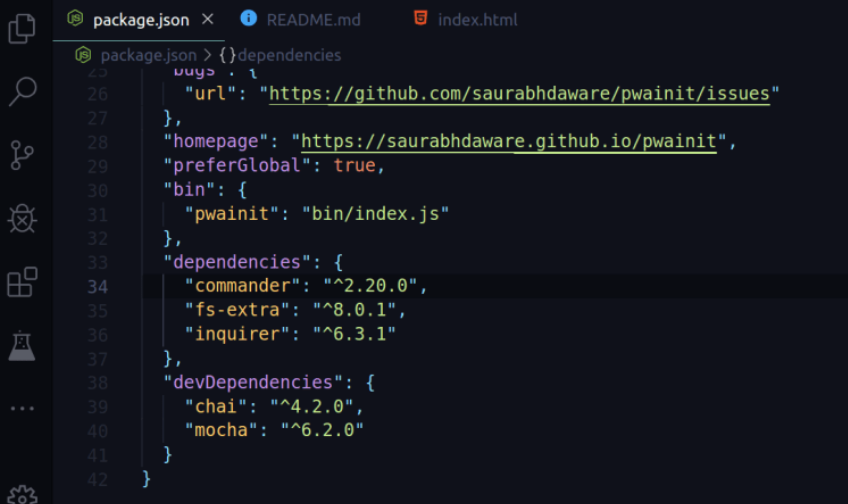
package.json is a file that contains information about your project (name, version, etc.) and it lists the packages that your project is dependent on.


So as you can see in the picture above after every dependency listed under package.json there's a number something like ^2.20.0 which is the version of that package but before the version, there is ^. So ^ (caret symbol) this little guy can be a total destroyer for your project.

^ sign before the version tells npm that if someone clones the project and runs npm install in the directory then install the latest minor version of the package in his node_modules.

So lets say I am having express with ^2.20.0 in package.json and then express team releases version 2.24.0 and now when someone clone my repo and runs npm install in that directory they will get the version 2.24.0 (You can also put ~ instead of ^ it will update to latest patch version)

However, this can be a huge issue if package developers break any of the functions on the minor version as it can make your application break down.

So npm later released a new file called package-lock.json to avoid such scenarios

package-lock.json:

package-lock.json will simply avoid this general behavior of installing updated minor version so when someone clones your repo and run npm install in their machine. NPM will look into package-lock.json and install exact versions of the package as the owner has installed so it will ignore the ^ and ~ from package.json.

Reference: https://medium.com/

Continue Reading →

Friday, 23 April 2021

Event Bubbling in JS

 The bubbling principle is simple.

When an event happens on an element, it first runs the handlers on it, then on its parent, then all the way up on other ancestors.

Let’s say we have 3 nested elements FORM > DIV > P with a handler on each of them:

<!DOCTYPE html>
<html>
<!doctype html>
<body>
<style>
  body * {
    margin10px;
    border1px solid blue;
  }
</style>

<form onclick="alert('form')">FORM
  <div onclick="alert('div')">DIV
    <p onclick="alert('p')">P</p>
  </div>
</form>
</body>
</html>

Click here for demo. https://www.w3schools.com/

A click on the inner <p> first runs onclick:

On that <p>.

Then on the outer <div>.

Then on the outer <form>.

And so on upwards till the document object.

So if we click on <p>, then we’ll see 3 alerts: p → div → form.

The process is called “bubbling”, because events “bubble” from the inner element up through parents like a bubble in the water.

Stopping bubbling

A bubbling event goes from the target element straight up. Normally it goes upwards till <html>, and then to document object, and some events even reach window, calling all handlers on the path.

But any handler may decide that the event has been fully processed and stop the bubbling.

The method for it is event.stopPropagation().

For instance, here body.onclick doesn’t work if you click on <button>:

<body onclick="alert(`the bubbling doesn't reach here`)">
    <button onclick="event.stopPropagation()">Click me</button>
  </body>

Reference : https://javascript.info/

Continue Reading →

Wednesday, 21 April 2021

Change detection in Angular

 What is change detection?

The basic mechanism of the change detection is to perform checks against two states, one is the current state, the other is the new state. If one of this state is different of the other, then something has changed, meaning we need to update (or re-render) the view.

Change Detection means updating the view (DOM) when the data has changed.

How Change Detection Works

A change detection cycle can be split into two parts:

  • Developer updates the application model
  • Angular syncs the updated model in the view by re-rendering it

Let us take a more detailed look at this process:

  • Developer updates the data model, e.g. by updating a component binding
  • Angular detects the change
  • Change detection checks every component in the component tree from top to bottom to see if the corresponding model has changed
  • If there is a new value, it will update the component’s view (DOM)

The following GIF demonstrates this process in a simplified way:


Reference: https://www.mokkapps.de/


Continue Reading →

Friday, 15 January 2021

Angular 6 - Get current route and it's data

 How to get current route you're in and get's it's data, children and it's parent?

say if this is the route structure:

const routesRoutes = [
    {path: 'home'component: HomeComponentdata: {title: 'Home'}},
    {
      path: 'about'
      component: AboutComponent
      data: {title: 'About'},
      children: [
        {
          path: 'company',
          component: 'CompanyComponent',
          data: {title: 'Company'}
        },
        {
          path: 'Hr',
          component: 'HrComponent',
          data: {title: 'HR'}
        },
        ...
      ]
    },
    ...
  ]
 

Below is the solution code:

@Component({...})
export class CompanyComponent implements OnInit {

constructor(
  private routerRouter,
  private routeActivatedRoute
) {}

ngOnInit() {
this.pageTitle = this.route.snapshot.data['title'];

  // Parent:  about 
  this.route.parent.url.subscribe(url => console.log(url[0].path));

  // Current Path:  company 
  this.route.url.subscribe(url => console.log(url[0].path));

  // Data:  { title: 'Company' } 
  this.route.data.subscribe(data => console.log(data));

  // Siblings
  console.log(this.router.config);
}
}

Passing data between routes using State


Continue Reading →

Thursday, 14 January 2021

Subject with Example | Angular2+

 What is a Subject?

Subject is a type of Observable in RxJs Library in which we can send our data to other components or services.

While Observables are unicast by design. Subjects can multicast. Multicasting basically means that one Observable execution is shared among multiple subscribers.

A Subject is like an Observable but can multicast to many observers which means subject is at the same time an Observable and an Observer. Understanding of Subject

Important points of subjects:

  1. A Subject is a Special type of Observable that allows value to be multicasted to many Observers.
  2. Subject are like event emitters.
  3. No Initial Value allowed

subject =new Subject<datatype>();  

Lets create a basic demo for subject.

1- Create an angular application using below command: ng new subjectDemo   

2- Add three components in app/src using below command: 

ng g c Component1 
ng g c Component2 
ng g c Component3 

3- After that open Component1.component.html file and paste the below code.

<div style="background-color: aliceblue;" class="card">  
    <div class="card-body">  
      <h5 class="card-title">Component 1</h5>  
      <input name="comp1" #comp1 type="text" />  
      <button (click)="onSubmit(comp1)">Submit</button>  
      <p class="card-text">{{Component1Data}}</p>  
    </div>  
</div> 

4- After that open Component1.component.ts file and paste the below code.

import { Component } from '@angular/core';
import { DataSharingService } from '../dataService.service';

@Component({
  selector: 'app-component1',
  templateUrl: './component1.component.html',
  styleUrls: ['./component1.component.scss']
})
export class Component1Component{

  Component1Dataany = '';  
  
  constructor(private DataSharingDataSharingService) {  
    this.DataSharing.SharingData.subscribe((resany=> {  
      this.Component1Data = res;  
    })  
  }  
  
  onSubmit(data: { valueany; }) {  
    this.DataSharing.SharingData.next(data.value);  
  }  
}

5- After that open Component2.component.html file and paste the below code.

<div style="background-color:antiquewhite" class="card">  
    <div class="card-body">  
      <h5 class="card-title">Component 2</h5>  
      <input name="comp2" #comp2 type="text" />  
      <button (click)="onSubmit(comp2)">Submit</button>  
      <p class="card-text">{{Component2Data}}</p>  
    </div>  
</div> 

6- After that open Component2.component.ts file and paste the below code.

import { Component } from '@angular/core';
import { DataSharingService } from '../dataService.service';

@Component({
  selector: 'app-component2',
  templateUrl: './component2.component.html',
  styleUrls: ['./component2.component.scss']
})
export class Component2Component{

  Component2Dataany = '';  
  constructor(private DataSharingDataSharingService) {  
    this.DataSharing.SharingData.subscribe((resany=> {  
      this.Component2Data = res;  
    })  
  }  
  
  onSubmit(data: { valueany; }) {  
    this.DataSharing.SharingData.next(data.value);  
  }  
}

7- After that open Component3.component.html file and paste the below code.

<div style="background-color:burlywood" class="card">  
    <div class="card-body">  
      <h5 class="card-title">Component 3</h5>  
      <input name="comp3" #comp3 type="text" />  
      <button (click)="onSubmit(comp3)">Submit</button>  
      <p class="card-text">{{Component3Data}}</p>  
    </div>  
</div>

8- After that open Component3.component.ts file and paste the below code.

import { ComponentOnInit } from '@angular/core';
import { DataSharingService } from '../dataService.service';

@Component({
  selector: 'app-component3',
  templateUrl: './component3.component.html',
  styleUrls: ['./component3.component.scss']
})
export class Component3Component {
  Component3Dataany = '';  
  
  constructor(private DataSharingDataSharingService) {  
    this.DataSharing.SharingData.subscribe((resany=> {  
      this.Component3Data = res;  
    })
  }

  onSubmit(data: { valueany; }) {  
    this.DataSharing.SharingData.next(data.value);  
  } 
}

9- Now in the app.component.html file lets import the components selector using the following command.

<div style="text-align: center; font-size: x-large; font-family: monospace;">Example of Subject in RxJs</div>  
<div style="margin:10px" class="card-deck">  
  <app-component1></app-component1>  
  <app-component2></app-component2>  
  <app-component3></app-component3>  
</div> 

10- Now let's create a service so that one service can transfer data and use the stream of data.

import { Injectable } from '@angular/core';  
import { Subject } from 'rxjs';  
  
@Injectable({  
  providedIn: 'root'  
})  
export class DataSharingService {  
  
  SharingData = new Subject();  
  constructor() { }  
}

11- Now Run the application using ng serve command.


Change data in one component and submit. You will see the output in all component. 


Continue Reading →

Tuesday, 13 October 2020

New Features in C# 6.0

 List of All New Features in C# 6.0

Microsoft has announced some new keywords and some new behavior of C# 6.0 in Visual Studio 2015.
  1. using Static.
  2. Auto property initializer.
  3. Dictionary Initializer.
  4. nameof Expression.
  5. New way for Exception filters.
  6. await in catch and finally block.
  7. Null – Conditional Operator.
  8. Expression – Bodied Methods
  9. Easily format strings – String interpolation
1. using Static
This is a new concept in C# 6.0 that allows us to use any class that is static as a namespace that is very useful for every developer in that code file where we need to call the static methods from a static class like in a number of times we need to call many methods from Convert.ToInt32() or Console.Write(),Console.WriteLine() so we need to write the class name first then the method name every time in C# 5.0. In C# 6.0 however Microsoft announced a new behavior to our cs compiler that allows me to call all the static methods from the static class without the name of the classes because now we need to first use our static class name in starting with all the namespaces.

using System;  
using static System.Convert;  
using static System.Console;  
namespace Project1  
{  
    class Program  
    {  
        static void Main(string[] args)  
        {  
            WriteLine("Enter first value ");  
            int val1 = ToInt32(ReadLine());  
            WriteLine("Value is : {0}", (val1));  
            ReadLine();  
        }  
    }  
}


2. Auto property initializer
Auto property initializer is a new concept to set the value of a property during of property declaration. We can set the default value of a read=only property, it means a property that only has a {get;} attribute. 

class Emp  
{  
    public string Name { getset; }="nitin";  
    public int Age { getset; }=25;  
    public int Salary { get; }=999;  

4. nameof Expression
nameof is new keyword in C# 6.0 and it's very useful from a developer's point of view because when we need to use a property, function or a data member name into a message as a string so we need to use the name as hard-coded in “name” in the string and in the future my property or method's name will be changed so it must change all the messages in every form or every page so it's very complicated to remember that how many number of times you already use the name of them in your project code files and this avoids having hardcoded strings to be specified in our code as well as avoids explicit use of reflection to get the names. Let's have an example.

nameof Returns the name of property in below code.
class Program  
    {  
        static void Main(string[] args)  
        {  
            Employee emp = new Employee();  
            WriteLine("{0} : {1}"nameof(Employee.Id), emp.Id);  
            WriteLine("{0} : {1}"nameof(Employee.Name), emp.Name);  
            WriteLine("{0} : {1}"nameof(Employee.Salary), emp.Salary);  
            ReadLine();  
        }  
    }  
    class Employee  
    {  
        public int Id { getset; } = 101;  
        public string Name { getset; } = "Nitin";  
        public int Salary { getset; } = 9999;  
    }  

5. Exception filters
Exception filters are a new concept for C#. In C# 6.0 they are already supported by the VB compiler but now they are coming into C#. Exception filters allow us to specify a condition with a catch block so if the condition will return true then the catch block is executed only if the condition is satisfied. This is also the best attribute of new C# 6.0 that makes it easy to do exception filtrations in also that type of code contains a large amount of source code. Let's have an example.

class Program  
    {  
        static void Main(string[] args)  
        {  
            int val1 = 0;  
            int val2 = 0;  
            try  
            {  
                WriteLine("Enter first value :");  
                val1 = int.Parse(ReadLine());  
                WriteLine("Enter Next value :");  
                val2 = int.Parse(ReadLine());  
                WriteLine("Div : {0}", (val1 / val2));  
            }  
            catch (Exception exif (val2 == 0)  
            {  
                WriteLine("Can't be Division by zero ☺");  
            }  
            catch (Exception ex)  
            {  
                WriteLine(ex.Message);  
            }  
            ReadLine();  
        }  
    }  

If the user enters an invalid value for division, like 0, then it will throw the exception that will be handled by Exception filtration where you mentioned an if() with catch{} block and the output will be something.

6. Await in catch and finally block
This is a new behavior of C# 6.0 that now we are able to call async methods from catch and also from finally. Using async methods are very useful because we can call then asynchronously and while working with async and await, you may have experienced that you want to put some of the result awaiting either in a catch or finally block or in both. 

public class MyMath  
{  
    public async void Div(int value1int value2)  
    {  
        try  
        {  
            int res = value1 / value2;  
            WriteLine("Div : {0}"res);  
        }  
        catch (Exception ex)  
        {  
            await asyncMethodForCatch();  
        }  
        finally  
        {  
            await asyncMethodForFinally();  
        }  
    }  
    private async Task asyncMethodForFinally()  
    {  
        WriteLine("Method from async finally Method !!");  
    }  

    private async Task asyncMethodForCatch()  
    {  
        WriteLine("Method from async Catch Method !!");  
    }  

7. Null-Conditional Operator
The Null-Conditional operator is a new concept in C# 6.0 that is very beneficial for a developer in a source code file that we want to compare an object or a reference data type with null. So we need to write multiple lines of code to compare the objects in previous versions of C# 5.0 but in C# 6.0 we can write an in-line null-conditional with the ? and ?? operators

class Program  
{  
   static void Main()  
    {  
        Employee emp = new Employee();  
        emp.Name = "Rahul Kumar";  
        emp.EmployeeAddress = new Address()  
        {  
            HomeAddress = "Lucknow",  
            OfficeAddress = "Kanpur"  
        };  
   WriteLine((emp?.Name) + "  " + (emp?.EmployeeAddress?.HomeAddress??"No Address"));  
      ReadLine();  
    }  
}

8. Expression–Bodied Methods
An Expression–Bodied Method is a very useful way to write a function in a new way and also very useful for those methods that can return their value by a single line so we can write those methods by using the “=>“ lamda Operator in C# 6.0

class Program  
    {  
        static void Main(string[] args)  
        {  
            WriteLine(GetTime());  
            ReadLine();  
        }  
static string GetTime()=> "Current Time - " + DateTime.Now.ToString("hh:mm:ss");  
               public int Compare(int aint b=> a == b ? 100 : 200;  

         // Method that call another method  
         public void called() => Display();   
    }  


9. Easily format strings using String interpolation
To easily format a string value in C# 6.0 without any string.Format() method we can write a format for a string using interpolation

    class Program  
    {  
        static void Main()  
        {  
            string FirstName = "Dotnet";  
            string LastName = "Guru";  
  
            // With String Interpolation in C# 6.0  
            string  output"\{FirstName}-\{LastName}";  
            WriteLine(output);   // Dotnet-Guru
            ReadLine();  
        }  


Continue Reading →

Topics

ADFS (1) ADO .Net (1) Ajax (1) Angular (47) Angular Js (15) ASP .Net (14) Authentication (4) Azure (3) Breeze.js (1) C# (55) CD (1) CI (2) CloudComputing (2) Coding (10) CQRS (1) CSS (2) Design_Pattern (7) DevOps (4) DI (3) Dotnet (10) DotnetCore (20) Entity Framework (5) ExpressJS (4) Html (4) IIS (1) Javascript (17) Jquery (8) jwtToken (4) Lamda (3) Linq (10) microservice (4) Mongodb (1) MVC (46) NodeJS (8) React (10) SDLC (1) Sql Server (32) SSIS (3) SSO (1) TypeScript (3) UI (1) UnitTest (2) WCF (14) Web Api (16) Web Service (1) XMl (1)

Dotnet Guru Archives