Showing posts with label ExpressJS. Show all posts

Friday, 7 December 2018

CORS in Express

CORS in Express using TypeScript

A quick walkthrough on configuring CORS in your Express app using TypeScript and the cors middleware.

Cross-origin resource sharing (CORS) is a mechanism that allows restricted resources (e.g. fonts) on a web page to be requested from another domain outside the domain from which the first resource was served.

My use case for CORS is an Angular application that is making REST requests to an API running in Express.js. I’ll be using TypeScript, which will be compiled to ES2015 (ES6) compatible JavaScript that will be executed in Node.js.

Getting Started
We’ll be using Express to serve up some awesome content. I will assume that you have already installed:
  1. Node.js
  2. npm - The node package manager
  3. An Express app
First, let’s install our dependencies. I’ll be using the cors middleware. So, let’s install that package as well as the TypeScript definitions:

$ npm install cors --save

Setting it up
Let’s dive into the server.js file where we will be enabling and configuring CORS in our Express app:

Simple Usage (Enable All CORS Requests)
var express = require('express')

var cors = require('cors')
var app = express()
app.use(cors())
app.get('/products/:id', function (req, res, next) {
  res.json({msg: 'This is CORS-enabled for all origins!'})
})

app.listen(80, function () {
  console.log('CORS-enabled web server listening on port 80')
})


Enable CORS for a Single Route
var express = require('express')
var cors = require('cors')
var app = express()

app.get('/products/:id', cors(), function (req, res, next) {
  res.json({msg: 'This is CORS-enabled for a Single Route'})
})

app.listen(80, function () {
  console.log('CORS-enabled web server listening on port 80')
})

Configuring CORS
const corsOptions  = {
  allowedHeaders: ["Origin", "X-Requested-With", "Content-Type", "Accept", "X-Access-Token"],
  credentials: true,
  methods: "GET,HEAD,OPTIONS,PUT,PATCH,POST,DELETE",
  origin: API_URL,
  preflightContinue: false
};


app.get('/products/:id', cors(corsOptions), function (req, res, next) {
  res.json({msg: 'This is CORS-enabled for only example.com.'})
}
Continue Reading →

Tuesday, 19 September 2017

ExpressJs Router

Routing refers to determining how an application responds to a client request to a particular endpoint, which is a URI (or path) and a specific HTTP request method (GET, POST, and so on). Express router is a class which helps us to create router handlers.
Each route can have one or more handler functions, which are executed when the route is matched.
var express = require('express')
var app = express()

app.METHOD(PATH, HANDLER)
  • app is an instance of express.
  • METHOD is an HTTP request method, in lowercase.
  • PATH is a path on the server.
  • HANDLER is the function executed when the route is matched.
The following examples illustrate defining simple routes.

Respond with Hello World! on the homepage:
app.get('/', function (req, res) {
  res.send('hello world')
})

Respond to POST request on the root route (/), the application’s home page:
app.post('/', function (req, res) {
  res.send('Got a POST request')
})

Respond to a PUT request to the /user route:
app.put('/user', function (req, res) {
  res.send('Got a PUT request at /user')
})

Respond to a DELETE request to the /user route:
app.delete('/user', function (req, res) {
  res.send('Got a DELETE request at /user')
})

Route methods
A route method is derived from one of the HTTP methods, and is attached to an instance of the express class.

The above code is an example of routes that are defined for the GET, POST, PUT, DELETE methods to the root of the app.

Express supports the following routing methods that correspond to HTTP methods:
get, post, put, head, delete, options, trace, copy, lock, mkcol, move, purge, unlock, report, mkactivity, checkout, merge, m-search, notify, subscribe, unsubscribe, patch and search.
There is a special routing method, app.all(), which is not derived from any HTTP method. This method is used for loading middleware functions at a path for all request methods.

In the following example, the handler will be executed for requests to “/isValid” whether you are using GET, POST, PUT, DELETE, or any other HTTP request method that is supported in the http module.
app.all('/isValid', function (req, res, next) {
  console.log('Accessing the Validate method...')
  next() // pass control to the next handler
})

Route paths
Route paths, in combination with a request method, define the endpoints at which requests can be made. Route paths can be strings, string patterns, or regular expressions.

The characters ?, +, *, and () are subsets of their regular expression counterparts. The hyphen (-) and the dot (.) are interpreted literally by string-based paths.

If you need to use the dollar character ($) in a path string, enclose it escaped within ([ and ]). For example, the path string for requests at “/data/$book”, would be “/data/([\$])book”.

Query strings are not part of the route path.

Here are some examples of route paths based on strings.

This route path will match requests to the root route, /.
app.get('/', function (req, res) {
  res.send('root')
})

This route path will match requests to /about.
app.get('/about', function (req, res) {
  res.send('about')
})

This route path will match requests to /random.text.
app.get('/random.text', function (req, res) {
  res.send('random.text')
})

Here are some examples of route paths based on string patterns.

This route path will match acd and abcd.
app.get('/ab?cd', function (req, res) {
  res.send('ab?cd')
})

This route path will match abcd, abbcd, abbbcd, and so on.
app.get('/ab+cd', function (req, res) {
  res.send('ab+cd')
})

This route path will match abcd, abxcd, abRANDOMcd, ab123cd, and so on.
app.get('/ab*cd', function (req, res) {
  res.send('ab*cd')
})

This route path will match /abe and /abcde.
app.get('/ab(cd)?e', function (req, res) {
  res.send('ab(cd)?e')
})

Examples of route paths based on regular expressions:

This route path will match anything with an “a” in the route name.
app.get(/a/, function (req, res) {
  res.send('/a/')
})

This route path will match butterfly and dragonfly, but not butterflyman, dragonflyman, and so on.
app.get(/.*fly$/, function (req, res) {
  res.send('/.*fly$/')
})

Route parameters
Route parameters are named URL segments that are used to capture the values specified at their position in the URL. The captured values are populated in the req.params object, with the name of the route parameter specified in the path as their respective keys.

Route path: /users/:userId/books/:bookId
Request URL: http://localhost:3000/users/34/books/8989
req.params: { "userId": "34", "bookId": "8989" }
To define routes with route parameters, simply specify the route parameters in the path of the route as shown below.
app.get('/users/:userId/books/:bookId', function (req, res) {
  res.send(req.params)
})

Route handlers
You can provide multiple callback functions that behave like middleware to handle a request. The only exception is that these callbacks might invoke next('route') to bypass the remaining route callbacks. You can use this mechanism to impose pre-conditions on a route, then pass control to subsequent routes if there’s no reason to proceed with the current route.
Route handlers can be in the form of a function, an array of functions, or combinations of both, as shown in the following examples.

More than one callback function can handle a route (make sure you specify the next object). For example:
app.get('/example/b', function (req, res, next) {
  console.log('the response will be sent by the next function ...')
  next()
}, function (req, res) {
  res.send('Hello from B!')
})

Response methods
The methods on the response object (res) in the following table can send a response to the client, and terminate the request-response cycle. If none of these methods are called from a route handler, the client request will be left hanging.
MethodDescription
res.download()Prompt a file to be downloaded.
res.end()End the response process.
res.json()Send a JSON response.
res.jsonp()Send a JSON response with JSONP support.
res.redirect()Redirect a request.
res.render()Render a view template.
res.send()Send a response of various types.
res.sendFile()Send a file as an octet stream.
res.sendStatus()Set the response status code and send its string representation as the response body.
app.route()
You can create chainable route handlers for a route path by using app.route(). Because the path is specified at a single location, creating modular routes is helpful, as is reducing redundancy and typos. For more information about routes, see: Router() documentation.
Here is an example of chained route handlers that are defined by using app.route().
app.route('/book')
  .get(function (req, res) {
    res.send('Get a random book')
  })
  .post(function (req, res) {
    res.send('Add a book')
  })
  .put(function (req, res) {
    res.send('Update the book')
  })

express.Router
Use the express.Router class to create modular, mountable route handlers. A Router instance is a complete middleware and routing system; for this reason, it is often referred to as a “mini-app”.
The following example creates a router as a module, loads a middleware function in it, defines some routes, and mounts the router module on a path in the main app.
Create a router file named apiRoutes.js in the app directory, with the following content:

const express = require('express'),
httpStatus = require('http-status');
const router = express.Router()

let users = [{
name: 'suraj',
address: 'noida',
contact: '9876543210'
}];

// middleware that is specific to this router
router.use(function timeLog (req, res, next) {
 if(req.params.id == 0) {
res.json({"message" : "You must pass ID other than 0"});    
}
else {
console.log(req.method, req.url); // log each request to the console
   next();}
})

router.get('/', (req, res) => {
res.status(httpStatus.OK).send(users);
}).post('/', (req, res) => {
const obj = req.body;
users.push(obj);
res.status(httpStatus.CREATED).send("created");
});

// Handle 404 error. 
// The last middleware.
router.use("*",function(req,res){
res.status(httpStatus.NOT_FOUND).send('404');
});

module.exports = router

Then, load the router module in the app:
const express= require('express'),
bodyParser= require('body-parser'),
apiRoutes=require('./server/routes/apiRoutes');

const app= express();        

//application/json
app.use(bodyParser.json());
app.use(bodyParser.urlencoded());

// apply the routes to our application
app.use('/api',apiRoutes);

const port = process.env.PORT || 1300;

app.listen(port, function() {
console.log('App listening on port ${port}!');
});

The body-parser module provides middleware for parsing JSON, plain text,
or just returning a raw Buffer object for you to deal with as needed.
app.use(bodyParser.json()) basically tells the system that you want json to be used.

Installation: $ npm install body-parser API: var bodyParser = require('body-parser')

Conclusion
With the inclusion of the Express 4.0 Router, we are given more flexibility than ever before in defining our routes. To recap, we can:
  1. Use express.Router() multiple times to define groups of routes
  2. Apply the express.Router() to a section of our site using app.use()
  3. Use route middleware to process requests
  4. Use route middleware to validate parameters using .param()
  5. Use app.route() as a shortcut to the Router to define multiple requests on a route
  6. With all the ways we can define routes, I'm sure that our applications will benefit going forward. Sound off in the comments if you have any questions or suggestions.

Continue Reading →

Monday, 18 September 2017

ExpressJS - a basic demo

We have set up the development [click here], now it is time to start developing our first app using Express. Create a new file called index.js and type the following in it.


 1
 2
 3
 4
 5
 6
 7
 8
 9
10
11
12
var express = require('express');
var app = express();

app.get('/', function(req, res){
res.send("Hello world!");
});

var server = app.listen(5000, function () {  
var host = server.address().address;  
var port = server.address().port;  
console.log('App listening at http://%s:%s', host, port);  
});  

Save the file, go to your terminal and type the following.

nodemon index.js

This will start the server. To test this app, open your browser and go to http://localhost:5000 and a message will be displayed as in the following screenshot.

How the App Works?
The first line imports Express in our file, we have access to it through the variable Express. We use it to create an application and assign it to var app.

app.get(route, callback)
This function tells what to do when a get request at the given route is called. The callback function has 2 parameters, request(req) and response(res). The request object(req) represents the HTTP request and has properties for the request query string, parameters, body, HTTP headers, etc. Similarly, the response object represents the HTTP response that the Express app sends when it receives an HTTP request.

res.send()
This function takes an object as input and it sends this to the requesting client. Here we are sending the string "Hello World!".

app.listen(port, [host], [backlog], [callback]])
This function binds and listens for connections on the specified host and port. Port is the only required parameter here.

S.No.Argument & Description
1
port
A port number on which the server should accept incoming requests.
2
host
Name of the domain. You need to set it when you deploy your apps to the cloud.
3
backlog
The maximum number of queued pending connections. The default is 511.
4
callback
An asynchronous function that is called when the server starts listening for requests.

Continue Reading →

ExpressJS - Intro and Environment

Express.js is a web application framework for Node.js. It is a fast, robust and asynchronous in nature.
You can assume Express as a layer built on the top of the Node.js that helps manage a server and routes. It provides a robust set of features to develop web and mobile applications.
It is an open source framework. Express was developed by TJ Holowaychuk and is maintained by the Node.js foundation and numerous open source contributors.

ExpressJS - Environment

To start with, you should have the Node and the npm (node package manager) installed.
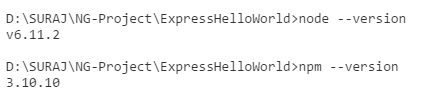
Confirm that node and npm are installed by running the following commands in your terminal.
node --version
npm --version
Now that we have Node and npm set up, let us understand what npm is and how to use it.

Node Package Manager(npm)
npm is the package manager for node. The npm Registry is a public collection of packages of open-source code for Node.js, front-end web apps, mobile apps, robots, routers, and countless other needs of the JavaScript community. npm allows us to access all these packages and install them locally. You can browse through the list of packages available on npm at npmJS.

How to use npm?
There are two ways to install a package using npm: globally and locally.

Globally − This method is generally used to install development tools and CLI based packages. To install a package globally, use the following code.
npm install -g <package-name>
Locally − This method is generally used to install frameworks and libraries. A locally installed package can be used only within the directory it is installed. To install a package locally, use the same command as above without the -g flag.
npm install <package-name>

Whenever we create a project using npm, we need to provide a package.json file, which has all the details about our project. npm makes it easy for us to set up this file. Let us set up our development project.

Step 1 − Start your terminal/cmd, create a new folder named ExpressHelloWorld and cd (create directory) into it −

Step 2 − Now to create the package.json file using npm, use the following code.
npm init
It will ask you for the following information.

Just keep pressing enter, and enter your name at the “author name” field.

Step 3 − Now we have our package.json file set up, we will further install Express. To install Express and add it to our package.json file, use the following command −
npm install --save express
Tip − The --save flag can be replaced by the -S flag. This flag ensures that Express is added as a dependency to our package.json file. This has an advantage, the next time we need to install all the dependencies of our project we can just run the command npm install and it will find the dependencies in this file and install them for us.

This is all we need to start development using the Express framework. To make our development process a lot easier, we will install a tool from npm, nodemon. This tool restarts our server as soon as we make a change in any of our files, otherwise we need to restart the server manually after each file modification. To install nodemon, use the following command −
npm install -g nodemon
You can now start working on Express.


Continue Reading →

Topics

ADFS (1) ADO .Net (1) Ajax (1) Angular (47) Angular Js (15) ASP .Net (14) Authentication (4) Azure (3) Breeze.js (1) C# (55) CD (1) CI (2) CloudComputing (2) Coding (10) CQRS (1) CSS (2) Design_Pattern (7) DevOps (4) DI (3) Dotnet (10) DotnetCore (20) Entity Framework (5) ExpressJS (4) Html (4) IIS (1) Javascript (17) Jquery (8) jwtToken (4) Lamda (3) Linq (10) microservice (4) Mongodb (1) MVC (46) NodeJS (8) React (10) SDLC (1) Sql Server (32) SSIS (3) SSO (1) TypeScript (3) UI (1) UnitTest (2) WCF (14) Web Api (16) Web Service (1) XMl (1)

Dotnet Guru Archives