Showing posts with label WCF. Show all posts

Wednesday, 21 November 2018

WCF Service as Windows Service

Host a WCF Service in a Managed Windows Service

This topic outlines the basic steps required to create a Windows Communication Foundation (WCF) service that is hosted by a Windows Service. The scenario is enabled by the managed Windows service hosting option that is a long-running WCF service hosted outside of Internet Information Services (IIS) in a secure environment that is not message activated. 

The service code includes a service implementation of the service contract, a Windows Service class, and an installer class. The service implementation class, CalculatorService, is a WCF service. The CalculatorWindowsService is a Windows service. To qualify as a Windows service, the class inherits from ServiceBase and implements the OnStartand OnStop methods. In OnStart, a ServiceHost is created for the CalculatorService type and opened. In OnStop, the service is stopped and disposed. The host is also responsible for providing a base address to the service host, which has been configured in application settings. The installer class, which inherits from Installer, allows the program to be installed as a Windows service by the Installutil.exe tool.

Construct the service and provide the hosting code
  1. Create a new Visual Studio Console app project called WcfAsWindows.
  2. Rename Program.cs to Service.cs.
  3. Change the namespace to Microsoft.ServiceModel.Samples.
  4. Add references to the following assemblies:
    • System.ServiceModel.dll
    • System.ServiceProcess.dll
    • System.Configuration.Install.dll
Add the following using statements to Service.cs.

using System.ComponentModel; using System.ServiceModel; using System.ServiceProcess; using System.Configuration; using System.Configuration.Install;

Define the ICalculator service contract as shown in the following code.

// Define a service contract.
[ServiceContract(Namespace = "http://Microsoft.ServiceModel.Samples")]
public interface ICalculator
{
    [OperationContract]
    double Add(double n1, double n2);
    [OperationContract]
    double Subtract(double n1, double n2);
    [OperationContract]
    double Multiply(double n1, double n2);
    [OperationContract]
    double Divide(double n1, double n2);
}

Implement the service contract in a class called CalculatorService as shown in the following code.

// Implement the ICalculator service contract in a service class.
public class CalculatorService : ICalculator
{
    // Implement the ICalculator methods.
    public double Add(double n1, double n2)
    {
        double result = n1 + n2;
        return result;
    }

    public double Subtract(double n1, double n2)
    {
        double result = n1 - n2;
        return result;
    }

    public double Multiply(double n1, double n2)
    {
        double result = n1 * n2;
        return result;
    }

    public double Divide(double n1, double n2)
    {
        double result = n1 / n2;
        return result;
    }
}

Create a new class called CalculatorWindowsService that inherits from the ServiceBase class. Add a local variable called serviceHost to reference the ServiceHost instance. Define the Main method that calls 

ServiceBase.Run(new CalculatorWindowsService)

public class CalculatorWindowsService : ServiceBase
{
    public ServiceHost serviceHost = null;
    public CalculatorWindowsService()
    {
        // Name the Windows Service
        ServiceName = "WCFWindowsServiceSample";
    }

    public static void Main()
    {
        ServiceBase.Run(new CalculatorWindowsService());
    }
 }

Override the OnStart(String[]) method by creating and opening a new ServiceHost instance as shown in the following code.

// Start the Windows service.
protected override void OnStart(string[] args)
{
    if (serviceHost != null)
    {
        serviceHost.Close();
    }

    // Create a ServiceHost for the CalculatorService type and 
    // provide the base address.
    serviceHost = new ServiceHost(typeof(CalculatorService));

    // Open the ServiceHostBase to create listeners and start 
    // listening for messages.
    serviceHost.Open();
}

Override the OnStop method closing the ServiceHost as shown in the following code.

protected override void OnStop()
{
    if (serviceHost != null)
    {
        serviceHost.Close();
        serviceHost = null;
    }
}

Create a new class called ProjectInstaller that inherits from Installer and that is marked with the RunInstallerAttribute set to true. This allows the Windows service to be installed by the Installutil.exe tool.

// Provide the ProjectInstaller class which allows 
// the service to be installed by the Installutil.exe tool
[RunInstaller(true)]
public class ProjectInstaller : Installer
{
    private ServiceProcessInstaller process;
    private ServiceInstaller service;

    public ProjectInstaller()
    {
        process = new ServiceProcessInstaller();
        process.Account = ServiceAccount.LocalSystem;
        service = new ServiceInstaller();
        service.ServiceName = "WCFWindowsServiceSample";
        Installers.Add(process);
        Installers.Add(service);
    }
}

Remove the Service class that was generated when you created the project.

Add an application configuration file to the project. Replace the contents of the file with the following configuration XML.

<?xml version="1.0" encoding="utf-8" ?>
<configuration>
  <system.serviceModel>    <services>
      <!-- This section is optional with the new configuration model
           introduced in .NET Framework 4. -->
      <service name="Microsoft.ServiceModel.Samples.CalculatorService"
               behaviorConfiguration="CalculatorServiceBehavior">
        <host>
          <baseAddresses>
            <add baseAddress="http://localhost:8000/ServiceModelSamples/service"/>
          </baseAddresses>
        </host>
        <!-- this endpoint is exposed at the base address provided by host: http://localhost:8000/ServiceModelSamples/service  -->
        <endpoint address=""
                  binding="wsHttpBinding"
                  contract="Microsoft.ServiceModel.Samples.ICalculator" />
        <!-- the mex endpoint is exposed at http://localhost:8000/ServiceModelSamples/service/mex -->
        <endpoint address="mex"
                  binding="mexHttpBinding"
                  contract="IMetadataExchange" />
      </service>
    </services>
    <behaviors>
      <serviceBehaviors>
        <behavior name="CalculatorServiceBehavior">
          <serviceMetadata httpGetEnabled="true"/>
          <serviceDebug includeExceptionDetailInFaults="False"/>
        </behavior>
      </serviceBehaviors>
    </behaviors>
  </system.serviceModel>
</configuration>

Right click the App.config file in the Solution Explorer and select Properties. Under Copy to Output Directoryselect Copy if Newer.

This example explicitly specifies endpoints in the configuration file. If you do not add any endpoints to the service, the runtime adds default endpoints for you. In this example, because the service has a ServiceMetadataBehavior set to true, your service also has publishing metadata enabled. For more information about default endpoints, bindings, and behaviors, see Simplified Configuration and Simplified Configuration for WCF Services.

Install and run the service

Build the solution to create the WcfAsWindows.exe executable.

Open Developer Command Prompt (Administration mode) for Visual Studio and navigate to the project directory. Type installutil bin\WcfAsWindows.exe at the command prompt to install the Windows service.


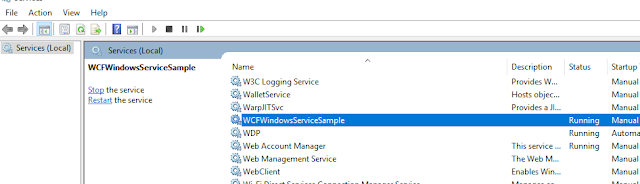
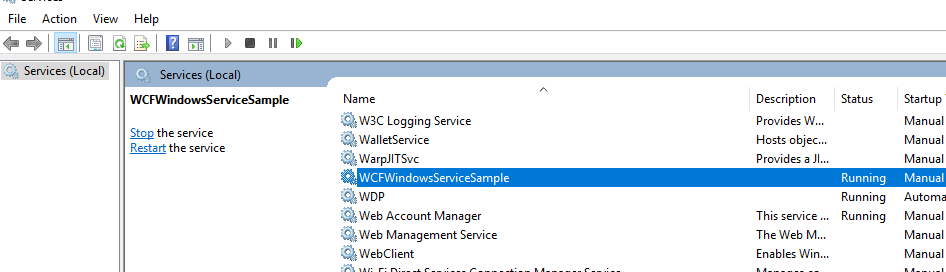
Type services.msc at the command prompt to access the Service Control Manager (SCM). The Windows service should appear in Services as "WCFWindowsServiceSample". The WCF service can only respond to clients if the Windows service is running. To start the service, right-click it in the SCM and select "Start", or type net start WCFWindowsServiceSample at the command prompt.

If you make changes to the service, you must first stop it and uninstall it. 
To uninstall the Windows service type installutil /u bin\service.exe at the command prompt.

Download the complete project click here


Continue Reading →

Monday, 9 April 2018

WCF Concurrency

Introduction
Concurrency is the control of multiple threads active in an InstanceContext at any given time. This is controlled using the System.ServiceModel.ServiceBehaviorAttribute. ConcurrencyMode is the ConcurrencyMode enumeration.

WCF concurrency will help us to configure how WCF service instances can serve multiple requests at the same time.

There are three basic types of concurrency supported by WCF 4.0:
  1. Single Concurrency Mode
  2. Multiple Concurrency Mode
  3. Reentrant Concurrency Mode
Single Concurrency Mode
When the service is set to Single Concurrency Mode, each instance context is allowed to have a maximum of one thread processing messages at the same time. In other words, WCF will provide synchronization with the service instance and not allow concurrent calls with a synchronization lock. In short only one request will proceed at any time and the next request must wait until the first request does not proceed.

Every incoming request must try to acquire the sync lock; if no lock is found then it allows access to the service and this request makes a sync lock. When finished operations, WCF will unlock the sync lock and allow other requests to come in. 

[ServiceBehavior(ConcurrencyMode = ConcurrencyMode.Single)]
public class Service1 : IService1{
     public string GetData(int value)
     {
          return string.Format("You entered: {0}", value);
     }
}

Multiple Concurrency Mode
When the service is set to Multiple Concurrency Mode, the service allows multiple accesses at the same time. Simply service instance is not associated with any sync lock. So that concurrent calls are allowed on the service instance. WCF does not create any queue for client messages and replays them as soon as they arrive. Each service has multiple threads processing messages concurrently. The service implementation must be thread-safe to use this concurrency mode.

With Concurrency Mode Multiple, threads can call an operation at any time. It is our responsibility to guard our state with locks. 

[ServiceBehavior(ConcurrencyMode = ConcurrencyMode.Multiple)]
public class Service1 : IService1{
    readonly object ThisLock = new object();
    public string GetData(int value)
    {
        string myRetString = string.Empty;
        lock (this.ThisLock)
        {
             myRetString = string.Format("You entered: {0}", value);
        }
        return myRetString;
    }
}

Reentrant Concurrency Mode
The Reentrant concurrency mode is nothing but a modified version of the single concurrency mode. Similar to single concurrency, reentrant concurrency is associated with a service instance and also sync lock. So that a concurrent call on the same instance is never called. In other words multiple calls on the same instance is not allowed.

[ServiceBehavior(ConcurrencyMode = ConcurrencyMode.Reentrant)]
public class Service3 : IService1{
     public string GetData(int value)
     {
          return string.Format("You entered: {0}", value); ;
     }
}

The service instance is single-threaded and accepts reentrant calls. When the reentrant service calls out, the service state must be in a consistent state, because others could be allowed into the service instance while the service calls out.

However, if the reentrant service call to another service or a callback, and that call chain (or causality) somehow wind its way back to the service instance.

The only case where a service configured with the Single Concurrency Mode can call back to its clients is when the callback contract operation is configured as one-way because there will not be a reply message to contend for the lock.

Continue Reading →

Thursday, 27 July 2017

Various types of WCF bindings

Choosing an Appropriate WCF binding


Basic binding

This binding is provided by the BasicHttpBinding class. It is designed to expose a WCF service as an ASMX web service, so that old clients (which are still using ASMX web service) can consume new service. By default, it uses Http protocol for transport and encodes the message in UTF - 8 text for-mat. You can also use Https with this binding.

Web binding

This binding is provided by the WebHttpBinding class. It is designed to expose WCF services as Http requests by using HTTP-GET, HTTP-POST. It is used with REST based services which may give output as an XML or JSON format. This is very much used with social networks for implementing a syndication feed.

Web Service (WS) binding

This binding is provided by the WSHttpBinding class. It is like as Basic binding and uses Http or Https protocols for transport. But this is designed to offer various WS - * specifications such as WS – Reliable Messaging, WS - Transactions, WS - Security and so on which are not supported by Basic binding.
   wsHttpBinding= basicHttpBinding + WS-* specification

WS Dual binding

This binding is provided by the WsDualHttpBinding class. It is like as wsHttpBinding except it supports bi-directional communication means both clients and services can send and receive messages.

TCP binding

This binding is provided by the NetTcpBinding class. It uses TCP protocol for communication between two machines with in intranet (means same network). It encodes the message in binary format. This is faster and more reliable binding as compared to the Http protocol bindings. It is only used when communication is WCF - to – WCF means both client and service should have WCF.

IPC binding

This binding is provided by the NetNamedPipeBinding class. It uses named pipe for Communication between two services on the same machine. This is the most secure and fastest binding among all the bindings.

MSMQ binding

This binding is provided by the NetMsmqBinding class. It uses MSMQ for transport and offers sup-port to disconnected message queued. It provides solutions for disconnected scenarios in which service processes the message at a different time than the client send the messages.

Federated WS binding

This binding is provided by the WSFederationHttpBinding class. It is a specialized form of WS binding and provides support to federated security.

Peer Network binding

This binding is provided by the NetPeerTcpBinding class. It uses TCP protocol but uses peer networking as transport. In this networking each machine (node) acts as a client and a server to the other nodes. This is used in the file sharing systems like torrent.

MSMQ Integration binding

This binding is provided by the MsmqIntegrationBinding class. This binding offers support to communicate with existing systems that communicate via MSMQ.
Continue Reading →

Tuesday, 25 July 2017

Message Exchange Patterns (MEPs) - WCF

Windows Communication Foundation supports the following Message Exchange Patterns (MEPs):
  • Request/Response
  • One Way
  • Duplex
Request/Response
It’s the default pattern. In this pattern, a response message will always be generated to consumer when the operation is called, even with the void return type. In this scenario (void return type), response will have empty SOAP body.
One Way
In some cases, we are interested to send a message to service in order to execute certain business functionality but not interested in receiving anything back. OneWay MEP will work in such scenarios. If we want queued message delivery, OneWay is the only available option.

Duplex
The Duplex MEP is basically a two-way message channel. In some cases, we want to send a message to service to initiate some longer-running processing and require a notification back from service in order to confirm that the requested process has been completed.


Continue Reading →

Friday, 14 July 2017

Method Overloading in WCF

Method overloading is the process of implementing Polymorphism in Object-Oriented Programming. A method can be overloaded on the basis of type of parameters, number of parameters, and an order of parameters.
As we know, WCF code is always coded on OOP's based programming language so that it does support method overloading.

Service Interface

[ServiceContract]
public interface ITest
{
    [OperationContract]
    string TestMethod(int para1,int para2);
    //Initail method
    [OperationContract]
    string TestMethod(string para1, string para2);
    //Overloading on the basis of type of parameters.
    [OperationContract]
    string TestMethod(int para1, string para2);
    //Overloading on the basis of  an order of parameters.
    [OperationContract]
    string TestMethod(int para1, string para2,double para3);
    //Overloading on the basis of the numbers of parameters
}

Service implementation


public class Test : ITest
{

    public string TestMethod(int para1, int para2)
    {
        return "TestMethod1";
    }

    public string TestMethod(string para1, string para2)
    {
        return "TestMethod2";
    }

    public string TestMethod(int para1, string para2)
    {
        return "TestMethod3";
    }

    public string TestMethod(int para1, string para2, double para3)
    {
        return "TestMethod4";
    }
}

Issues of method overloading in WCF
Once test the above code on WCF test client, it will throw an error contract mismatch because of the WSDL that does n't allow to create duplicate methods for clients.

Error: Cannot obtain Metadata from http://localhost:61489/Test.svc If this is a Windows (R) Communication Foundation 
service to which you have access, please check that you have enabled metadata publishing at the specified address. 
For help enabling metadata publishing, 
please refer to the MSDN documentation at http://go.microsoft.com/fwlink/?LinkId=65455.WS-Metadata

Exchange Error    URI: http://localhost:61489/Test.svc    Metadata contains a reference that cannot 

be resolved: 'http://localhost:61489/Test.svc'.    The server did not provide a meaningful reply; this might 
be caused by a contract mismatch, a premature session shutdown or an internal server error.

HTTP GET Error    URI: http://localhost:61489/Test.svc    There was an error downloading 

'http://localhost:61489/Test.svc'.    The request failed with the error message:--&lt;html>
&lt;head>        &lt;title>The type 'MethOverWCF.Test', provided as the Service attribute
value in the ServiceHost directive, or provided in the configuration element 
system.serviceModel/serviceHostingEnvironment/serviceActivations could not be found


Solution of method overloading issue in WCF

By adding unique operationcontract behavior, we can be achieved method overloading in WCF. OperationContract has the Name property that exposes the WCF methods to WSDL Schemas.

[ServiceContract]
public interface ITest
{
    [OperationContract(Name="Method1")]
    string TestMethod(int para1,int para2);
    //Initail method
    [OperationContract(Name = "Method2")]
    string TestMethod(string para1, string para2);
    //Overloading on the basis of type of parameters.
    [OperationContract(Name = "Method3")]
    string TestMethod(int para1, string para2);
    //Overloading on the basis of  an order of parameters.
    [OperationContract(Name = "Method4")]
    string TestMethod(int para1, string para2,double para3);
    //Overloading on the basis of the numbers of parameters
}

Creating Client and Consuming overloaded WCF service methods

In WCF client, all service methods are called by exact same name as define in the OperationContract but method overloaded methods are called by their attribute name. In the given sample code has four different attributes (Method1, Method2, Method3, and Method4) which are exposed by overloaded TestMethod of WCF.

using WCFConsoleClentApp.MyTest;
namespace WCFConsoleClentApp
{
    class Program
    {
        static void Main(string[] args)
        {
            TestClient client = new TestClient();
            string callMethod1 = client.Method1(1, 1);
            string callMethod2 = client.Method2("Test", "Test");
            string callMethod3 = client.Method3(1, "Test");
            string callMethod4 = client.Method4(1, "Test", 3.5);
        }
    }
}

Continue Reading →

Wednesday, 20 May 2015

WCF Security

In this article, we will start with transport and message security understanding. We will then see simple code samples of how to implement transport and message security using WsHTTP bindings. We will also see the differences between ‘BasicHttpBinding’ and ‘WsHttpBinding’ with the help of a simple code. WCF security is a huge topic by itself, but I am sure with this article you will get a quick start of how to go about WCF security.

Core Security Features that WCF addresses?

There are four core security features that WCF addresses:
  • Confidentiality: This feature ensures that information does not go in to the wrong hands when it travels from the sender to the receiver.
  • Integrity: This feature ensures that the receiver of the message gets the same information that the sender sent without any data tampering.
  • Authentication: This feature verifies who the sender is and who the receiver is.
  • Authorization: This feature verifies whether the user is authorized to perform the action they are requesting from the application.

Transport level and Message level security?

When we talk about WCF security, there are two aspects. The first is the data and the second is the medium on which the data travels, i.e., the protocol. WCF has the ability to apply security at the transport level (i.e., protocol level) and also at message level (i.e., data).

Transport level security happens at the channel level. Transport level security is the easiest to implement as it happens at the communication level. WCF uses transport protocols like TCP, HTTP, MSMQ, etc., and each of these protocols have their own security mechanisms. One of the common implementations of transport level security is HTTPS. HTTPS is implemented over HTTP protocols with SSL providing the security mechanism. No coding change is required, it’s more about using the existing security mechanism provided by the protocol.

Message level security is implemented with message data itself. Due to this, it is independent of the protocol. One of the common ways of implementing message level security is by encrypting data using some standard encryption algorithm.

For which bindings are transport, message, and mixed mode supported?

Below is a table which shows which mode is supported for each binding. We are not discussing mixed mode. It’s nothing but a combination of transport and mixed modes. For instance, data encrypted and passed over WsHttp using HTTPS is a mixed mode security. Encryption is nothing but message security and HTTPS is a transport mode. In combination, they form mixed mode.

BindingTransport Mode?Message Mode?Mixed Mode?
BasicHttpBindingYesYesYes
WsHttpBindingYesYesYes
WsDualHttpBindingNoYesNo
NetTcpBindingYesYesYes
NetNamedPipeBindingYesNoNo
NetMsmqBindingYesYesNo
MsmqIntegrationBindingYesNoNo

The scenarios, advantages, and disadvantages of transport and message security?

TransportMessage
Scenarios when we should be using one of themWhen there are no intermediate systems in between, this is the best methodology.
If it’s an intranet type of solution, this is the most recommended methodology.
When there are intermediate systems like one more WCF service through which message is routed, then message security is the way to go.
Advantages
  • Does not need any extra coding as protocol inherent security is used.
  • Performance is better as we can use hardware accelerators to enhance performance.
  • There is a lot of interoperability support and communicating clients do not need to understand WS security as it’s built in the protocol itself.
  • Provides end to end security as it’s not dependent on the protocol. Any intermediate hop in the network does not affect the application.
  • Supports a wide set of security options as it is not dependent on the protocol. We can also implement custom security.
Disadvantages
  • As it’s a protocol implemented security, it works only point to point.
  • As security is dependent on protocol, it has limited security support and is bound to the protocol security limitations.
  • Needs application refactoring to implement security.
  • As every message is encrypted and signed, there are performance issues.
  • Does not support interoperability with old ASMX webservices.


For Transport level Security we have to do:
1- Enable transport level security in the web.config file of the service

This is done using the Security XML tag as shown in the below code snippet.

<bindings>
    <wsHttpBinding>
        <binding name="TransportSecurity">
            <security mode="Transport">
                <transport clientCredentialType="None"/>
            </security>
        </binding>
    </wsHttpBinding>
</bindings>


2- Tie up the binding and specify HTTPS configuration

We need to now tie up the bindings with the end points. So use the bindingConfiguration tag to specify the binding name. We also need to specify the address where the service is hosted. Please note the HTTS in the address tag.
Change mexHttpBinding to mexHttpsBinding in the second end point.

<service name="WCFWSHttps.Service1" behaviorConfiguration="WCFWSHttps.Service1Behavior">
<!-- Service Endpoints -->
<endpoint address="https://localhost/WCFWSHttps/Service1.svc"
  binding="wsHttpBinding" bindingConfiguration="TransportSecurity"
  contract="WCFWSHttps.IService1"/>
<endpoint address="mex" binding="mexHttpsBinding" contract="IMetadataExchange"/>
</service>

In serviceMetadata, we also need to change httpGetEnabled to httpsGetEnabled.

<serviceBehaviors>
........
.........
<serviceMetadata httpsGetEnabled="true"/>
.........
.........
</serviceBehaviors>

3- Make the web application HTTPS enabled

Now the necessary configuration changes are done, it’s time to compile the WCF service project and host it in an IIS application with HTTPS enabled.

Resource: Click here
one more helpfull is here

Thanks
~Suraj K. Mad.
Continue Reading →

Topics

ADFS (1) ADO .Net (1) Ajax (1) Angular (47) Angular Js (15) ASP .Net (14) Authentication (4) Azure (3) Breeze.js (1) C# (55) CD (1) CI (2) CloudComputing (2) Coding (10) CQRS (1) CSS (2) Design_Pattern (7) DevOps (4) DI (3) Dotnet (10) DotnetCore (20) Entity Framework (5) ExpressJS (4) Html (4) IIS (1) Javascript (17) Jquery (8) jwtToken (4) Lamda (3) Linq (10) microservice (4) Mongodb (1) MVC (46) NodeJS (8) React (10) SDLC (1) Sql Server (32) SSIS (3) SSO (1) TypeScript (3) UI (1) UnitTest (2) WCF (14) Web Api (16) Web Service (1) XMl (1)

Dotnet Guru Archives