Showing posts with label Design_Pattern. Show all posts

Sunday, 6 October 2024

Clean Architecture

What is Clean Architecture?

Clean Architecture is a design pattern that separates an application into different layers based on their responsibility.  It’s a way of organizing your code into independent, testable, and reusable components. 

It isolates the business logic of the application from external details such as user interfaces, databases, and frameworks.
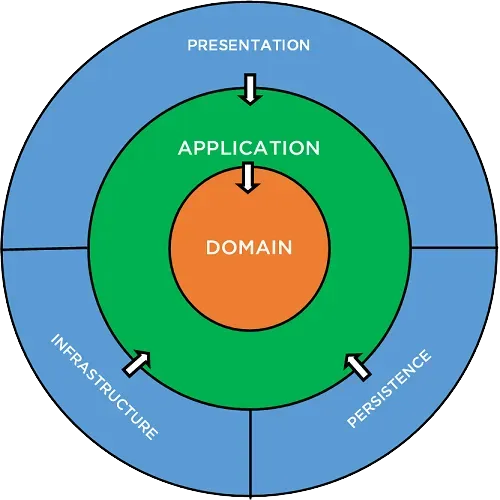
The primary objective of Clean Architecture is to create a structure that makes it easy to manage and maintain an application as it grows and changes over time. It also makes it easy to add new features, fix bugs, and make changes to existing functionality without affecting the rest of the application.

Implementing Clean Architecture in ASP .NET Core Web API

To apply Clean Architecture, we can divide the application into four primary layers:

Domain Layer – The domain layer represents the application’s core business rules and entities. This is the innermost layer and should not have any external dependencies. It contains domain entities, value objects, and domain services.

Application Layer – The application layer sits just outside the domain layer and acts as an intermediary between the domain layer and other layers. In other words, it contains the use cases of the application and we expose the core business rules of the domain layer through the application layer. This layer depends just on the domain layer.

Infrastructure Layer – We implement all the external services like databases, file storage, emails, etc. in the infrastructure layer. It contains the implementations of the interfaces defined in the domain layer.

Presentation Layer – The presentation layer handles the user interactions and fetches data to the user interface. It contains the user interface components (e.g., MVC, API Controllers, Blazor components).

With Clean Architecture, the Domain and Application layers are at the center of the design. This is known as the Core of the system.

The Domain layer contains enterprise logic and types and the Application layer contains business logic and types. The difference is that enterprise logic could be shared across many systems, whereas the business logic will typically only be used within this system.

Implementing the Project Structure:

Creating the Core Layer:

  1. Define Entities and Use Cases.
  2. Create a folder named “Core.”
  3. Within this folder, classes for Entities such as “User.cs” or “Product.cs” are created.
  4. Create interfaces or abstract classes for Use Cases like “IUserService.cs”.

Creating the Application Layer:

  1. Implement Use Cases.
  2. Create a folder named “Application.”
  3. Implement Use Cases as classes that inherit from the interfaces defined in the Core layer.
  4. For example: “UserService.cs”.

Creating the Infrastructure Layer:

  1. Implement Interface Adapters.
  2. Create a folder named “Infrastructure.”
  3. Implement concrete classes for the interfaces defined in the Core layer.
  4. For example: “UserRepository.cs” for “IUserRepository”.

Project Structure


Benefits of Clean Architecture:

Maintainability: Easier to modify and extend the system.

Flexibility: Adapts to changing requirements with minimal impact on other components.

Scalability: Better suited for large, complex systems.

Reference: 

https://code-maze.com/ , 

https://positiwise.com/, 

https://www.macrix.eu/ ,

https://medium.com/, 


Continue Reading →

Saturday, 11 November 2023

CQRS pattern

CQRS, or Command Query Responsibility Segregation, is a design pattern that separates the responsibilities of reading and writing data in a software system. Here’s a breakdown of its key concepts:

Key Concepts

  1. Separation of Concerns:

    • Commands: These are actions that change the state of the system (e.g., creating, updating, or deleting data). They do not return data.
    • Queries: These are operations that retrieve data without altering the system’s state. They are designed for read operations.

Here's a simple example of implementing the CQRS pattern in C#:

 // Command
public class CreateProductCommand
{
    public string Name { get; set; }
    public decimal Price { get; set; }
}

// Command Handler
public class CreateProductCommandHandler
{
    public void Handle(CreateProductCommand command)
    {
        // Logic to create a new product and update the state
        // This might involve validation, persistence, and other business logic

        Console.WriteLine($"Product '{command.Name}' created successfully with price {command.Price}");
    }
}

// Query
public class GetProductQuery
{
    public int ProductId { get; set; }
}

// Query Handler
public class GetProductQueryHandler
{
    public Product Handle(GetProductQuery query)
    {
        // Logic to retrieve product information from the state
        // This might involve querying a database, caching, or other mechanisms

        return new Product
        {
            ProductId = query.ProductId,
            Name = "Sample Product",
            Price = 29.99m
        };
    }
}

// Model
public class Product
{
    public int ProductId { get; set; }
    public string Name { get; set; }
    public decimal Price { get; set; }
}

// Example Usage
class Program
{
    static void Main()
    {
        // Command side usage
        var createProductCommand = new CreateProductCommand
        {
            Name = "Example Product",
            Price = 49.99m
        };

        var createProductHandler = new CreateProductCommandHandler();
        createProductHandler.Handle(createProductCommand);

        // Query side usage
        var getProductQuery = new GetProductQuery
        {
            ProductId = 1
        };

        var getProductHandler = new GetProductQueryHandler();
        var product = getProductHandler.Handle(getProductQuery);

        Console.WriteLine($"Product Name: {product.Name}, Price: {product.Price}");
    }
}

In this example, the CreateProductCommand represents a command for creating a new product, and the CreateProductCommandHandler handles this command, updating the system state accordingly. On the query side, the GetProductQuery represents a query to retrieve product information, and the GetProductQueryHandler handles this query, providing the necessary data from the system state. The Product class is a simple model representing a product.

Benefits:

  • Scalability: By separating reads and writes, you can optimize each side independently. For instance, you might use different data stores or caching mechanisms for reading.
  • Performance: Read and write models can be tailored for their specific tasks, potentially improving performance.
  • Flexibility: Allows for different data models for reads and writes, which can simplify complex domains.

Reference: https://www.c-sharpcorner.com


Continue Reading →

Sunday, 23 September 2018

Introduction To Design Pattern

Design patterns represent the best practices used by experienced object-oriented software developers. Design patterns are solutions to general problems that software developers faced during software development. 
Design pattern are evolved over a period of time by experienced software developers. They promote re usability which leads to a more robust and maintainable code. 
The Design patterns can be classified into three main categories: 
  1. Creational Patterns
  2. Structural Patterns
  3. Behavioral Patterns
Creational Patterns- Creational design patterns are related to the way of creating objects. Creational design patterns are used when a decision is made at the time of instantiation of a class.  
  • Factory method/Template
  • Singleton
  • Abstract Factory
  • Builder
  • Prototype
Structural Patterns- Structural design patterns are concerned with how classes and objects can be composed, to form larger structures.
 The structural design patterns simplifies the structure by identifying the relationships.
These patterns focus on, how the classes inherit from each other and how they are composed from other classes.
  • Adapter
  • Proxy
  • Bridge
  • Filter
  • Composite
  • Decorator
  • Façade
  • Flyweight
Behavioral Patterns- Behavioral patterns are concerned with the assignment of responsibilities between objects, or, encapsulating behavior in an object and delegating requests to it.
Unlike the Creational and Structural patterns, which deal with the instantiation process and the blueprint of objects and classes, the central idea here is to concentrate on the way objects are interconnected. In a word, we can say this: If Creational is about instantiation, and Structural is the blueprint, then Behavioral is the pattern of the relationship among objects.
  • Interpreter
  • Strategy pattern
  • Template method/ pattern
  • Chain of responsibility
  • Command pattern
  • Iterator pattern
  • Visitor pattern
What Is Factory Pattern?
Factory it's such a Design Pattern which defines an interface for creating an object, but lets the classes that implement the interface decide which class to instantiate. Factory Pattern lets a class postpone instantiation to sub-classes. For more info. clink on the link  http://softmindit.blogspot.com/, Link 1

What is Singleton Pattern
Singleton pattern is a creational pattern which allows only one instance of a class to be created which will be available to the whole application. The major advantage of Singleton design pattern is its saves memory because the single instance is reused again and again; there is no need to create a new object at each request. For example, in our application, we can use a single database connection shared by multiple objects, instead of creating a database connection for every request.

What are the drawbacks of using singleton design pattern?
The major drawbacks of using singleton design pattern are:
a)Singleton causes code to be tightly coupled. The singleton object is exposed globally and is available to a whole application. Thus, classes using this object become tightly coupled; any change in the global object will impact all other classes using it.
b)Singleton Pattern does not support inheritance.

Adapter: is a structural design pattern This allows incompatible classes to work together by converting the interface of one class into another.  
 If you have two applications, with one spitting out output as XML with the other requiring JSON input, then you’ll need an adapter between the two to make them work seamlessly.

Proxy: is a structural design pattern that provides an object that acts as a substitute for a real service object used by a client. A proxy receives client requests, does some work (access control, caching, etc.) and then passes the request to a service object. Click here for more

What Is Strategy Pattern?
In Strategy pattern, a class behavior or its algorithm can be changed at run time. This type of design pattern comes under behavior pattern.
In Strategy pattern, we create objects which represent various strategies and a context object whose behavior varies as per its strategy object. The strategy object changes the executing algorithm of the context object.
Real-World Analogy: Imagine that you have to get to the airport. You can catch a bus, order a cab, or get on your bicycle. These are your transportation strategies. You can pick one of the strategies depending on factors such as budget or time constraints. LINK 1, Link 2

Intercepting Filter Pattern: The intercepting filter design pattern is used when we want to do some pre-processing / post-processing with request or response of the application. Filters are defined and applied on the request before passing the request to actual target application. Filters can do the authentication/ authorization/ logging or tracking of request and then pass the requests to corresponding handlers. Following are the entities of this type of design pattern.

Observer Pattern: This pattern is a one-to-many dependency between objects so that when one object changes state, all its dependents are notified.
 For the sake of simplicity, think about what happens when you follow someone on Twitter. You are essentially asking Twitter to send you (the observer) tweet updates of the person (the subject) you followed. The pattern consists of two actors, the observer who is interested in the updates and the subject who generates the updates.
 A subject can have many observers and is a one to many relationship. However, an observer is free to subscribe to updates from other subjects too. You can subscribe to news feed from a Facebook page, which would be the subject and whenever the page has a new post, the subscriber would see the new post.


MVC Pattern: MVC Pattern stands for Model-View-Controller Pattern. This pattern is used to separate application's concerns.
For more design patter under the link Click here
Continue Reading →

Friday, 30 June 2017

Factory Pattern Example Code in C#

In This Console Program I have Created an Interface and two Classes to implement the Interface.
Next, I created the factory class clsFactory, in which conditions are there to create object. In this class besically, method decides which class object to be created.
In the Main method I'm calling the Factory class.

See the below code:
using System;

namespace testDemo
{
    public interface IMath
    {
        int GetData(int num1, int num2);
    }

    public class Addition : IMath
    {
        public int GetData(int num1, int num2)
        {
            int Final = num1 + num2;
            return Final;
        }
    }

    public class Subtraction : IMath
    {
        public int GetData(int num1, int num2)
        {
            int Final = num1 - num2;
            return Final;
        }
    }
    public class clsFactory
    {
        static public IMath CreateandGetObj(int choice)
        {
            IMath imath = null;

            switch (choice)
            {
                case 1:
                    imath = new Addition();
                    break;
                case 2:
                    imath = new Subtraction();
                    break;
                default:
                    imath = new Addition();
                    break;
            }
            return imath;
        }
    }

public class Program
    {
        static void Main()
        {
            Console.WriteLine("What Operation you Want?");
            Console.WriteLine("1: Addition");
            Console.WriteLine("2: Subtraction");
            Console.WriteLine("Enter you Option and press Enter: ");
            string i = Console.ReadLine();
            IMath ObjIntrface = null;
            ObjIntrface = clsFactory.CreateandGetObj(Convert.ToInt16(i));  // 1= Add, 2= subtract
            int res = ObjIntrface.GetData(4, 7);
            Console.WriteLine(res);
            Console.ReadLine();
        }
    }

See the Output:

Continue Reading →

Wednesday, 22 February 2017

Singleton Design Pattern

What is singleton pattern?
The singleton pattern is one of the simplest design patterns:
There are only two points in the definition of a singleton design pattern,
  1. There should be only one instance allowed for a class and
  2. We should allow global point of access to that single instance.
This structural code demonstrates the Singleton pattern which assures only a single instance
(the singleton) of the class can be created.

using System;

namespace ConsoleApp1
{
    /// <summary>  
    /// MainApp startup class for Structural  
    /// Singleton Design Pattern.  
    /// </summary>  
    class MainApp
    {
        /// <summary>  
        /// Entry point into console application.  
        /// </summary>  
        static void Main()
        {
            // Constructor is protected -- cannot use new  
            Singleton s1 = Singleton.Instance();
            Singleton s2 = Singleton.Instance();
            // Test for same instance  
            if (s1 == s2)
            {
                Console.WriteLine("Objects are the same instance");
            }
            // Wait for user  
            Console.ReadKey();
        }
    }

    /// <summary>  
    /// The Thread safe 'Singleton' class  
    /// </summary>  
    class Singleton
    {
        // Holds the single instance of the class.
        private static Singleton _instance;

        //Ensures that only one thread can enter the critical section at a time.
        private static readonly object _lock = new object();

        // Constructor is 'protected'  
        protected Singleton()
        {
        }
        public static Singleton Instance()
        {
            // First check (without locking) for performance
            if (_instance == null)
            {
                lock (_lock)
                {
                    // Second check (with locking) to ensure only one instance is created
                    if (_instance == null)
                    {
                        _instance = new Singleton();
                    }
                }
            }
            return _instance;
        }
    }
}

When to use Singleton classes
A very simple example is say Logger, suppose we need to implement the logger and log it to some file according to date time. In this case, we cannot have more than one instances of Logger in the application otherwise the file in which we need to log will be created with every instance.
We use Singleton pattern for this and instantiate the logger when the first request hits or when the server is started.

Here is how it looks:
public class Singleton {

// Holds the single instance of the class.
    private static Singleton instance;   
  
// Private constructor to Prevents external instantiation.
    private Singleton(){}
  
    public static Singleton getInstance() {
      if (instance == null)
        instance = new Singleton();
      return instance;
    }
  }

As you can see, the constructor is private, so we are unable instantiate it in the normal fashion. What you have to do is call it like this:
public Singleton singleton = Singleton.getInstance();

When you do this, the getInstance() method then checks to see if the parameter ‘instance’ is null. If it is, it will create a new one by calling the private constructor. After that, it just returns it. Of course, if it is not null, it just returns the existing instance of it. This insures that there is only one copy of the object within your program.

Singleton Pattern Versus Static Class-
Both singleton classes and static classes are design patterns used to manage instances and state, but they serve different purposes and have distinct characteristics. 

Here are the key differences between them:

Singleton Class

Instance Control: A singleton class allows only one instance of the class to be created. It provides a global point of access to that instance.
State: A singleton can maintain state across its methods, as it holds an instance that can have instance variables.
Lazy Initialization: Singleton instances can be created lazily (i.e., only when needed) or eagerly (at application startup).
Inheritability: Singleton classes can be subclassed, allowing for the possibility of extended functionality.
Instantiation: You typically control the instantiation of a singleton via a private constructor and a static method to get the instance.

Static Class

No Instance Control: A static class cannot be instantiated. It can only contain static members (methods and properties), and there is no concept of an instance.
No State: Static classes do not maintain state. Any data must be stored in static fields, which are shared across all calls.
Eager Initialization: Static classes are often initialized when the application starts, and their members can be accessed without creating an instance.
No Inheritability: Static classes cannot be subclassed or instantiated, as they do not allow for inheritance.
Accessibility: All members of a static class are inherently static, and can be accessed directly via the class name without creating an object.

Summary
Singleton: One instance, can maintain state, supports lazy initialization, can be subclassed.
Static Class: No instances, cannot maintain state, initialized at startup, cannot be subclassed.

Choosing between a singleton and a static class often depends on whether you need to maintain state and whether you want the flexibility of inheritance and instance methods.


Continue Reading →

SOLID Design Principles

S.O.L.I.D:
The First 5 Principles of Object Oriented Design
S.O.L.I.D is an acronym for the first five object-oriented design(OOD) principles

SOLID Principles is a coding standard that all developers should have a clear concept for developing software in a proper way to avoid a bad design.
When the developer builds a software following the bad design, the code can become inflexible and more brittle, small changes in the software can result in bugs. For these reasons, we should follow SOLID Principles.

S.O.L.I.D STANDS FOR:

When expanded the acronyms might seem complicated, but they are pretty simple to grasp.

S – Single-responsiblity principle
O – Open-closed principle
L – Liskov substitution principle
I – Interface segregation principle
D – Dependency Inversion Principle

Let’s look at each principle individually to understand why S.O.L.I.D can help make us
better developers.

Single-responsibility Principle
S.R.P for short – this principle states that:

A class should have one and only one reason to change, meaning that a class should have
only one job.

Example:  A typical example could a EmailSender class:
This should just deal with sending an email out. this should not be responsible for loading the email content from database or even formatting the email content to be sent.

Open-closed Principle
Objects or entities should be open for extension, but closed for modification. This simply
means that a class should be easily extendable without modifying the class itself.
Creating new extension methods are the example of this principles.

Example: See the below code, there are 2 types of customer New and Existing, we have implemented If and Else for both customer. This is Ok if we have only these two type of customer.
class Customer
{
    int Type;
    void Add()
    {
        if (Type == 0)
        {
            Console.Write("AddNewCustomer");
        }
        else
        {
            Console.Write("AddExistingCustomer");
        }
    }
}

But what If we have to add new type? Here we modify our code to implement OCP, See the below code: 
public class CustomerBetter
    {
        public virtual void Add()
        {
            Console.Write("AddNewCustomer");
        }
    }

    class ExistingCustomer : CustomerBetter
    {
        public override void Add()
        {
            Console.Write("ExistingCustomer");
        }
    }

    class AnotherCustomer : CustomerBetter
    {
        public override void Add()
        {
            Console.Write("AnotherCustomer");
        }
    }

Liskov substitution principle

All this is stating is that every subclass/derived class should be substitutable for their
base/parent class. 

“Provides ability to replace any instance of a parent class with an instance of one of its child classes without negative side effects”  https://medium.com/swlh

Interface segregation principle

A client should never be forced to implement an interface that it doesn’t use or clients
shouldn’t be forced to depend on methods they do not use.

Example: We have one interface ICustomer which have two function Add() and Read().   Customer1 class implementing the ICustome interface. This works perfectly fine here.

interface ICustomer 
{
    void Add();
    void Read();
}

class Customer1 : ICustomer
{
    void Add()
    {
        // Add functionality here!
    }

    void Read()
    {
        // Read functionality here!
    }
}

Now we have another customer named Customer2 who wants to implement only Add() function from interface ICustomer . With the current interface It's not possible. Let's break the interface for two classes.
interface ICustomer 
{
    void Add();
}

interface ICustomerV2 
{
    void Read();
}

class Customer1 : ICustomer, ICustomerV2 
{
  // Implement Add and read function both
}

class Customer2 : ICustomer
{
  // Implement only Add function
}
Examples can be seen here, https://github.com/

Dependency Inversion principle
Entities must depend on abstractions not on concretions. It states that the high level module must not depend on the low level module, but they should depend on abstractions.

If we don’t follow SOLID Principles we  
1. End up with tight or strong coupling of the code with many other modules/applications
2. Tight coupling causes time to implement any new requirement, features or any bug fixes and some times it creates unknown issues
3. End up with a code which is not testable
4. End up with duplication of code
5. End up creating new bugs by fixing another bug
6. End up with many unknown issues in the application development cycle

Following SOLID Principles helps us to  
1. Achieve reduction in complexity of code
2. Increase readability, extensibility and maintenance
3. Reduce error and implement Reusability
4. Achieve Better testability
5. Reduce tight coupling


Continue Reading →

Tuesday, 2 June 2015

Factory Design Pattern - C#

Design patterns are general reusable solutions to common problems that occurred in software designing. There are broadly 3 categories of design patterns, i.e., Creational, Behavioral and Structural.

Now, Factory Design Pattern falls under the category of creational design pattern.
Factory design pattern is one of the common design pattern  in software project. Let’s understand the basic of Factory design patern.


         It deals with the problem of creating objects without specifying the exact class of object that will be created. The essence of this pattern is to "Define an interface for creating an object, but let the classes that implement the interface decide which class to instantiate. 

Definition:Factory it's such a Design Pattern which defines an interface for creating an object, but lets the classes that implement the interface decide which class to instantiate. Factory Pattern lets a class postpone instantiation to sub-classes.

Factory design pattern is one of the common design pattern  in software project. Let’s understand the basic of Factory design pattern.


See the Simplest Example Code Factory Pattern Example Code in C#

Factory Method Pattern - UML Diagram & Implementation

The UML class diagram for the implementation of the factory method design pattern is given below:


The classes, interfaces and objects in the above UML class diagram are as follows:

Product
This is an interface for creating the objects.

ConcreteProduct
This is a class which implements the Product interface.

Creator
This is an abstract class and declares the factory method, which returns an object of type Product.

ConcreteCreator
This is a class which implements the Creator class and overrides the factory method to return an instance of a ConcreteProduct.

C# - Implementation Code

interface Product
{

}

class ConcreteProductA : Product
{
}

class ConcreteProductB : Product
{
}

abstract class Creator
{
    public abstract Product FactoryMethod(string type);
}

class ConcreteCreator : Creator
{
    public override Product FactoryMethod(string type)
    {
        switch (type)
        {
            case "A": return new ConcreteProductA();
            case "B": return new ConcreteProductB();
            default: throw new ArgumentException("Invalid type", "type");
        }
    }
}

Factory Method Pattern - Example


Who is what?
The classes, interfaces and objects in the above class diagram can be identified as follows:

IFactory - Interface
Scooter & Bike - Concreate Product classes
VehicleFactory - Creator
ConcreteVehicleFactory - Concreate Creator

namespace FactoryDesignPattern
{
    /// <summary>
    /// The 'Product' interface
    /// </summary>
    public interface IFactory
    {
        void Drive(int miles);
    }

    /// <summary>
    /// A 'Concrete Scooter' class
    /// </summary>
    public class Scooter : IFactory
    {
        public void Drive(int miles)
        {
            Console.WriteLine("Drive the Scooter : " + miles.ToString() + "km");
        }
    }

    /// <summary>
    /// A 'Concrete Bike' class
    /// </summary>
    public class Bike : IFactory
    {
        public void Drive(int miles)
        {
            Console.WriteLine("Drive the Bike : " + miles.ToString() + "km");
        }
    }

    /// <summary>
    /// The Creator Abstract Class
    /// </summary>
    public abstract class VehicleFactory
    {
        public abstract IFactory GetVehicle(string Vehicle);

    }

    /// <summary>
    /// A 'ConcreteCreator' class
    /// </summary>
    public class ConcreteVehicleFactory : VehicleFactory
    {
        public override IFactory GetVehicle(string Vehicle)
        {
            switch (Vehicle)
            {
                case "Scooter":
                    return new Scooter();
                case "Bike":
                    return new Bike();
                default:
                    throw new ApplicationException(string.Format("Vehicle '{0}' 
cannot be created", Vehicle));
            }
        }
    }


   public class Program
    {
        static void Main(string[] args)
        {
            VehicleFactory factory = new ConcreteVehicleFactory();

            IFactory scooter = factory.GetVehicle("Scooter");
            scooter.Drive(10);

            IFactory bike = factory.GetVehicle("Bike");
            bike.Drive(20);

            Console.ReadKey();
        }
    }
}

Factory Pattern Demo - Output


When to use it?
  1. Subclasses figure out what objects should be created.
  2. Parent class allows later instantiation to subclasses means the creation of object is done when it is required.
  3. The process of objects creation is required to centralize within the application.
  4. A class (creator) will not know what classes it will be required to create.
Some more usefull links are: link1, link2
Continue Reading →

Topics

ADFS (1) ADO .Net (1) Ajax (1) Angular (47) Angular Js (15) ASP .Net (14) Authentication (4) Azure (3) Breeze.js (1) C# (55) CD (1) CI (2) CloudComputing (2) Coding (10) CQRS (1) CSS (2) Design_Pattern (7) DevOps (4) DI (3) Dotnet (10) DotnetCore (20) Entity Framework (5) ExpressJS (4) Html (4) IIS (1) Javascript (17) Jquery (8) jwtToken (4) Lamda (3) Linq (10) microservice (4) Mongodb (1) MVC (46) NodeJS (8) React (10) SDLC (1) Sql Server (32) SSIS (3) SSO (1) TypeScript (3) UI (1) UnitTest (2) WCF (14) Web Api (16) Web Service (1) XMl (1)

Dotnet Guru Archives