Friday, 14 April 2017

AngularJS Authentication

AngularJS Authentication with JWT(JSON web tokens)

JWTs provide a way for clients to authenticate every request without having to maintain a session or repeatedly pass login credentials to the server. A JWT consists of three main components: a header object, a claims object, and a signature. These three properties are encoded using base64, then concatenated with periods as separators. Some important things to know about JWT's:

The claims object contains an expiration date which dictates how long the token is valid for
The claims object can also contain custom bits of information such as a user ID
The token is NOT encrypted so anyone with it can read all the properties
The token IS signed by the server so if any of the values are changed, the server will reject it


Continue Reading →

Thursday, 13 April 2017

EmailId Validation IN Sql Server

Create a User defined function to Validate EmailID in Sql Server

Create FUNCTION UDFValidateEmail (@email varChar(255))

RETURNS bit
AS
begin
return
(
select 
Case 
When  @Email is null then 0                  --NULL Email is invalid
When charindex(' ', @email)  <> 0 or --Check for invalid character
charindex('/', @email)  <> 0 or --Check for invalid character
charindex(':', @email)  <> 0 or --Check for invalid character
charindex(';', @email)  <> 0 then 0 --Check for invalid character
When len(@Email)-<= charindex('.', @Email) then 0--check for '%._' at end of string
When  @Email like '%@%@%'or 
@Email Not Like '%@%.%'  then 0--Check for duplicate @ or invalid format
Else 1
END
)
end

Now call the Udf to validate  Email

SELECT dbo.UDFValidateEmail('suraj@dotnetguru.in')

Valid Email returns 1 while Invalid Email returns 0 as output.
Continue Reading →

Sunday, 2 April 2017

Windows Azure and Cloud Computing - A Glance

Windows Azure, which was later renamed as Microsoft Azure in 2014, is a cloud computing platform, designed by Microsoft to successfully build, deploy, and manage applications and services through a global network of datacenters. 

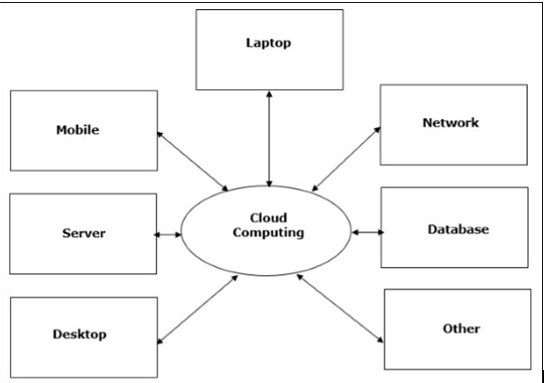
The popular trend in today's technology driven world is ‘Cloud Computing’. Cloud computing can be referred to as the storing and accessing of data over the internet rather than your computer's hard drive.

One prominent example of cloud computing is Office 365 which allows users to store, access, edit their MS Office documents online (in browser) without installing the actual program on their device.


Types of Cloud
The storage options on cloud is in 3 forms −
  • Public
  • Private
  • Hybrid
    Public Cloud − A service provider makes the clouds available to the general public which is termed as a public cloud. These clouds are accessed through internet by users. These are open to public and their infrastructure is owned and operated by service providers as in case of Google and Microsoft.
         Private Cloud − These clouds are dedicated to a particular organization. That particular organization can use the cloud for storing the company's data, hosting business application, etc. The data stored on private cloud can't be shared with other organizations. The cloud is managed either by the organization itself or by the third party.
         Hybrid Cloud − When two or more clouds are bound together to offer the advantage of both public and private clouds, they are termed as Hybrid Cloud. Organizations can use private clouds for sensitive application, while public clouds for non-sensitive applications. The hybrid clouds provide flexible, scalable and cost-effective solutions to the organizations.

Benefits of Cloud

There are many benefits of clouds. Some of them are listed below.
·     Cloud service offers scalability. Allocation and de-allocation of resources is dynamically as per demand.
·    It saves on cost by reducing capital infrastructure.
·    It allows the user to access the application independent of their location and hardware configuration.
· It simplifies the network and lets the client access the application without buying license for individual machine.
·   Storing data on clouds is more reliable as it is not lost easily.
What are IaaS, PaaS and SaaS?
Generally, cloud computing services fall into these three broad categories:
  1. IaaS
  2. PaaS
  3. SaaS
IaaS (Infrastructure as a Service)
IaaS is the most basic level of cloud-based solutions, which refers to renting an IT infrastructure as a fully outsourced service. In this category, the cloud provider lets you rent servers, VMs, storage, network and operating systems on a pay-as-you-go basis.

Examples:
Amazon EC2 and S3, Google Compute Engine, Windows Azure.

PaaS (Platform as a Service)
PaaS is the cloud solution where, apart from providing an infrastructure, cloud providers also issue an on-demand computing environment to develop, test, run and collaborate with components such as web servers, database management systems, and software development kits (SDKs) for various programming languages.

Examples:
AWS Elastic Beanstalk, Heroku, Windows Azure, Force.com, Google App Engine.

SaaS (Software as a Service)
SaaS providers offer fully functional web-based application softwares tailored to a variety of business needs such as project tracking, web conferencing, marketing automation or business analytics.

Examples:
Google Apps, Microsoft Office 365, Gmail, Yahoo and Facebook.

These three different types of cloud computing services also offer different amounts of convenience and different amounts of control to the user. In that regard, they stack up as such:


Continue Reading →

Wednesday, 22 February 2017

Singleton Design Pattern

What is singleton pattern?
The singleton pattern is one of the simplest design patterns:
There are only two points in the definition of a singleton design pattern,
  1. There should be only one instance allowed for a class and
  2. We should allow global point of access to that single instance.
This structural code demonstrates the Singleton pattern which assures only a single instance
(the singleton) of the class can be created.

using System;

namespace ConsoleApp1
{
    /// <summary>  
    /// MainApp startup class for Structural  
    /// Singleton Design Pattern.  
    /// </summary>  
    class MainApp
    {
        /// <summary>  
        /// Entry point into console application.  
        /// </summary>  
        static void Main()
        {
            // Constructor is protected -- cannot use new  
            Singleton s1 = Singleton.Instance();
            Singleton s2 = Singleton.Instance();
            // Test for same instance  
            if (s1 == s2)
            {
                Console.WriteLine("Objects are the same instance");
            }
            // Wait for user  
            Console.ReadKey();
        }
    }

    /// <summary>  
    /// The Thread safe 'Singleton' class  
    /// </summary>  
    class Singleton
    {
        // Holds the single instance of the class.
        private static Singleton _instance;

        //Ensures that only one thread can enter the critical section at a time.
        private static readonly object _lock = new object();

        // Constructor is 'protected'  
        protected Singleton()
        {
        }
        public static Singleton Instance()
        {
            // First check (without locking) for performance
            if (_instance == null)
            {
                lock (_lock)
                {
                    // Second check (with locking) to ensure only one instance is created
                    if (_instance == null)
                    {
                        _instance = new Singleton();
                    }
                }
            }
            return _instance;
        }
    }
}

When to use Singleton classes
A very simple example is say Logger, suppose we need to implement the logger and log it to some file according to date time. In this case, we cannot have more than one instances of Logger in the application otherwise the file in which we need to log will be created with every instance.
We use Singleton pattern for this and instantiate the logger when the first request hits or when the server is started.

Here is how it looks:
public class Singleton {

// Holds the single instance of the class.
    private static Singleton instance;   
  
// Private constructor to Prevents external instantiation.
    private Singleton(){}
  
    public static Singleton getInstance() {
      if (instance == null)
        instance = new Singleton();
      return instance;
    }
  }

As you can see, the constructor is private, so we are unable instantiate it in the normal fashion. What you have to do is call it like this:
public Singleton singleton = Singleton.getInstance();

When you do this, the getInstance() method then checks to see if the parameter ‘instance’ is null. If it is, it will create a new one by calling the private constructor. After that, it just returns it. Of course, if it is not null, it just returns the existing instance of it. This insures that there is only one copy of the object within your program.

Singleton Pattern Versus Static Class-
Both singleton classes and static classes are design patterns used to manage instances and state, but they serve different purposes and have distinct characteristics. 

Here are the key differences between them:

Singleton Class

Instance Control: A singleton class allows only one instance of the class to be created. It provides a global point of access to that instance.
State: A singleton can maintain state across its methods, as it holds an instance that can have instance variables.
Lazy Initialization: Singleton instances can be created lazily (i.e., only when needed) or eagerly (at application startup).
Inheritability: Singleton classes can be subclassed, allowing for the possibility of extended functionality.
Instantiation: You typically control the instantiation of a singleton via a private constructor and a static method to get the instance.

Static Class

No Instance Control: A static class cannot be instantiated. It can only contain static members (methods and properties), and there is no concept of an instance.
No State: Static classes do not maintain state. Any data must be stored in static fields, which are shared across all calls.
Eager Initialization: Static classes are often initialized when the application starts, and their members can be accessed without creating an instance.
No Inheritability: Static classes cannot be subclassed or instantiated, as they do not allow for inheritance.
Accessibility: All members of a static class are inherently static, and can be accessed directly via the class name without creating an object.

Summary
Singleton: One instance, can maintain state, supports lazy initialization, can be subclassed.
Static Class: No instances, cannot maintain state, initialized at startup, cannot be subclassed.

Choosing between a singleton and a static class often depends on whether you need to maintain state and whether you want the flexibility of inheritance and instance methods.


Continue Reading →

SOLID Design Principles

S.O.L.I.D:
The First 5 Principles of Object Oriented Design
S.O.L.I.D is an acronym for the first five object-oriented design(OOD) principles

SOLID Principles is a coding standard that all developers should have a clear concept for developing software in a proper way to avoid a bad design.
When the developer builds a software following the bad design, the code can become inflexible and more brittle, small changes in the software can result in bugs. For these reasons, we should follow SOLID Principles.

S.O.L.I.D STANDS FOR:

When expanded the acronyms might seem complicated, but they are pretty simple to grasp.

S – Single-responsiblity principle
O – Open-closed principle
L – Liskov substitution principle
I – Interface segregation principle
D – Dependency Inversion Principle

Let’s look at each principle individually to understand why S.O.L.I.D can help make us
better developers.

Single-responsibility Principle
S.R.P for short – this principle states that:

A class should have one and only one reason to change, meaning that a class should have
only one job.

Example:  A typical example could a EmailSender class:
This should just deal with sending an email out. this should not be responsible for loading the email content from database or even formatting the email content to be sent.

Open-closed Principle
Objects or entities should be open for extension, but closed for modification. This simply
means that a class should be easily extendable without modifying the class itself.
Creating new extension methods are the example of this principles.

Example: See the below code, there are 2 types of customer New and Existing, we have implemented If and Else for both customer. This is Ok if we have only these two type of customer.
class Customer
{
    int Type;
    void Add()
    {
        if (Type == 0)
        {
            Console.Write("AddNewCustomer");
        }
        else
        {
            Console.Write("AddExistingCustomer");
        }
    }
}

But what If we have to add new type? Here we modify our code to implement OCP, See the below code: 
public class CustomerBetter
    {
        public virtual void Add()
        {
            Console.Write("AddNewCustomer");
        }
    }

    class ExistingCustomer : CustomerBetter
    {
        public override void Add()
        {
            Console.Write("ExistingCustomer");
        }
    }

    class AnotherCustomer : CustomerBetter
    {
        public override void Add()
        {
            Console.Write("AnotherCustomer");
        }
    }

Liskov substitution principle

All this is stating is that every subclass/derived class should be substitutable for their
base/parent class. 

“Provides ability to replace any instance of a parent class with an instance of one of its child classes without negative side effects”  https://medium.com/swlh

Interface segregation principle

A client should never be forced to implement an interface that it doesn’t use or clients
shouldn’t be forced to depend on methods they do not use.

Example: We have one interface ICustomer which have two function Add() and Read().   Customer1 class implementing the ICustome interface. This works perfectly fine here.

interface ICustomer 
{
    void Add();
    void Read();
}

class Customer1 : ICustomer
{
    void Add()
    {
        // Add functionality here!
    }

    void Read()
    {
        // Read functionality here!
    }
}

Now we have another customer named Customer2 who wants to implement only Add() function from interface ICustomer . With the current interface It's not possible. Let's break the interface for two classes.
interface ICustomer 
{
    void Add();
}

interface ICustomerV2 
{
    void Read();
}

class Customer1 : ICustomerICustomerV2 
{
  // Implement Add and read function both
}

class Customer2 : ICustomer
{
  // Implement only Add function
}
Examples can be seen herehttps://github.com/

Dependency Inversion principle
Entities must depend on abstractions not on concretions. It states that the high level module must not depend on the low level module, but they should depend on abstractions.

If we don’t follow SOLID Principles we  
1. End up with tight or strong coupling of the code with many other modules/applications
2. Tight coupling causes time to implement any new requirement, features or any bug fixes and some times it creates unknown issues
3. End up with a code which is not testable
4. End up with duplication of code
5. End up creating new bugs by fixing another bug
6. End up with many unknown issues in the application development cycle

Following SOLID Principles helps us to  
1. Achieve reduction in complexity of code
2. Increase readability, extensibility and maintenance
3. Reduce error and implement Reusability
4. Achieve Better testability
5. Reduce tight coupling


Continue Reading →

Tuesday, 31 January 2017

Get the class properties in the list

In this article you will learn, how you can access your class properties value in a list and perform whatever operation you want with the properties value.
below is my Class named Employee. this class contains four properties.

    public class Employee
    {
        public string FirstName { getset; }
        public string LastName { getset; }
        public string Address { getset; }
        public string Mobile { getset; }
    }

In the below class I'm calling a function that takes my class object and add all the property value in the list.
GetPolicyDataString function concating all values with tild "~" seprated.

   class Program
    {
        static void Main(string[] args)
        {
            Employee pi = new testGenrateString.Employee();
            pi.FirstName = "SURAJ";
            pi.LastName = "MADDHESHIYA";
            pi.Address="Berlin";
            pi.Mobile = "8527123456";
            Program p = new testGenrateString.Program();
            var val = p.GetPolicyDataString(pi);
            Console.WriteLine(val);
            Console.Read();
        }

        public string GetPolicyDataString(Employee ppInfo)
        {
            string dataString = string.Empty;
            List<string> lstString = new List<string>();
            foreach (var prop in ppInfo.GetType().GetProperties())
            {
                lstString.Add(Convert.ToString(prop.GetValue(ppInfo, null)));
            }
             dataString = string.Join("~", lstString.ToArray());

            return dataString;
        }
    }

OUTPUT


Continue Reading →

Saturday, 21 January 2017

STUFF() - SQL Server

Description:
STUFF function is used to append number of characters from one string and replace them with another string. So, you can say this function insert string into another string, it removes all the specified length of string and insert other string value on that place.

Syntax
STUFF(stringstartlengthadd_string) 

Example:
1- SELECT STUFF('dotnetguru.in',12,2, 'com') as [stuff eg]

2- SELECT STUFF('www.dotnetguru.in',1, 0, 'http://')  as [stuff eg]

Output:

1- dotnetguru.com
2- http://www.dotnetguru.in
Continue Reading →

Topics

ADFS (1) ADO .Net (1) Ajax (1) Angular (47) Angular Js (15) ASP .Net (14) Authentication (4) Azure (3) Breeze.js (1) C# (55) CD (1) CI (2) CloudComputing (2) Coding (10) CQRS (1) CSS (2) Design_Pattern (7) DevOps (4) DI (3) Dotnet (10) DotnetCore (20) Entity Framework (5) ExpressJS (4) Html (4) IIS (1) Javascript (17) Jquery (8) jwtToken (4) Lamda (3) Linq (10) microservice (4) Mongodb (1) MVC (46) NodeJS (8) React (10) SDLC (1) Sql Server (32) SSIS (3) SSO (1) TypeScript (3) UI (1) UnitTest (2) WCF (14) Web Api (16) Web Service (1) XMl (1)

Dotnet Guru Archives