Friday, 26 December 2014

Custom Filters in MVC

~ Custom Filters in MVC - Authorization , Action, Result, Exception Filters ~

Filters in MVC are attributes which you can apply to a controller action or an entire controller. This will allow us to add pre and post behavior to controller action methods.


There are 4 types of Filters. Which were described in above image.

Step 1: Create a simple MVC Web application. Lets see the Output Cache filter first.
I created a View and pertaining Action method. See them below.

ACTION METHOD
        /// <summary>
        /// OutputCache Test
        /// </summary>
        /// <returns></returns>
        [OutputCache(Duration = 10)]
        public ActionResult OutPutTest()
        {
            ViewBag.Date = DateTime.Now.ToString("T");
            return View();
        }

VIEW
@{
    ViewBag.Title = "OutPutTest";
}
<h2>OutPutTest</h2>

<h3>@ViewBag.Date</h3>


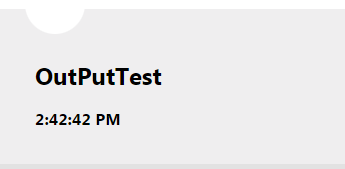
Output : so as per the current implementation, the view should be displaying current time with seconds. so for every refresh, the seconds part will be changed...
But observe the [OutputCache(Duration=10)] attribute applied to action method. This will make the response cached for 10 seconds. Thus the seconds part will not be changed for next 10 seconds.


Step 2: Authorization Filter : This filter will be executed once after user is authenticated
In this step lets create a custom Authorization filter. For this create a class which inherits AuthorizeAttribute or implements IAuthorizationFilter interface. All we are doing here is just passing a message to View.

    public class CustAuthFilter : AuthorizeAttribute
    {
        public override void OnAuthorization(AuthorizationContext filterContext)
        {
            filterContext.Controller.ViewBag.AutherizationMessage = "Custom Authorization: Message from OnAuthorization method.";
        }
      }

Now we have our CustomAuthFilter which will be executed immedealty after user is authenticated. But inorder to make it happen we need to apply this [CustAuthFilter] attribute on top either a custom action or to an entire controller itself.

ACTION METHOD
        /// <summary>
        /// Custom Authorization Filter Test
        /// </summary>
        /// <returns></returns>
        [CustAuthFilter]
        public ActionResult AuthFilterTest()
        {
            return View();
        }
 VIEW
@{
    ViewBag.Title = "AuthFilterTest";
}

<h2>AuthFilterTest</h2>

<h3>@ViewBag.AutherizationMessage</h3>

We have another method OnUnauthorizedRequest event to redirect the unauthorized users to some default pages. 

OUTPUT:  


Step 3: Action Filter : There are 4 events available in an action filter.
  1. OnActionExecuting - Runs before execution of Action method.
  2. OnActionExecuted - Runs after execution of Action method.
  3. OnResultExecuting - Runs before content is rendered to View.
  4. OnResultExecuted - Runs after content is rendered to view.
So lets create a CustomActionFilter. Create a class inherting ActionFilterAttribute class of implementing IActionFilter and IResultFilter interfaces.

public class CustomActionFilter : ActionFilterAttribute
    {
        public override void OnActionExecuting(ActionExecutingContext filterContext)
        {
            filterContext.Controller.ViewBag.CustomActionMessage1 = "Custom Action Filter: Message from OnActionExecuting method.";
        }

        public override void OnActionExecuted(ActionExecutedContext filterContext)
        {
            filterContext.Controller.ViewBag.CustomActionMessage2 = "Custom Action Filter: Message from OnActionExecuted method.";
        }

        public override void OnResultExecuting(ResultExecutingContext filterContext)
        {
            filterContext.Controller.ViewBag.CustomActionMessage3 = "Custom Action Filter: Message from OnResultExecuting method.";
        }

        public override void OnResultExecuted(ResultExecutedContext filterContext)
        {
            filterContext.Controller.ViewBag.CustomActionMessage4 = "Custom Action Filter: Message from OnResultExecuted method.";
        }       
    }

Now all we need to do is to apply [CustomActionFilter] attribute on an Action Method.

ACTION METHOD
        /// <summary>
        /// Custom Action Filters Test
        /// </summary>
        /// <returns></returns>
        [CustomActionFilter]
        public ActionResult ActionFilterTest()
        {
            return View();
        }

VIEW
@{
    ViewBag.Title = "ActionFilterTest";
}

<h2>ActionFilterTest</h2>
<br />

<br />
<h3>@ViewBag.CustomActionMessage1</h3>
<br />
<h3>@ViewBag.CustomActionMessage2</h3>
<br />
<h3>@ViewBag.CustomActionMessage3</h3>
<br />
<h3>@ViewBag.CustomActionMessage4</h3>

OUTPUT:  


Step 4: Exception Filter: This filter is used to capture any execptions if raised by controller or an action method. Create a class which will inherit FilterAttribute class and implement IExceptionFilter interface.

    public class CustExceptionFilter : FilterAttribute, IExceptionFilter
    {
        public void OnException(ExceptionContext filterContext)
        {
            filterContext.Controller.ViewBag.ExceptionMessage = "Custom Exception: Message from OnException method.";
        }
    }
Now all we need to do to handle any exceptions or erros is to apply [CustExceptionFilter] attribute on an Action Method.

ACTION METHOD
        /// <summary>
        /// Custom Exception Filter Test
        /// </summary>
        /// <returns></returns>
        [CustExceptionFilter]
        public ActionResult ExceptionFilterTest()
        {
            return View();
        }

VIEW
@{
    ViewBag.Title = "ExceptionFilterTest";
}

<h2>ExceptionFilterTest</h2>
<br />
<h3>@ViewBag.ExceptionMessage</h3>

OUTPUT: 

Now compare the output with the view definition and see the differences.

First thing is , we dint have any message from OnResultExecuted event.

Reason: That event will be executed after content is rendered to view, so by that time the view is rendered, OnResultExecuted event is not and message is not yet assigned to ViewBag.

Second thing, we dint have any message from exception filter. If there is any exception raised by the code, then the Exception Filter codee will come into picture. With this , we have covered different kinds of filters in MVC and how to create custom filters and how to apply them.
Download the Required Files for this Project  - Click here

Is it helpful for you? Kindly let me know your comments / Questions.
Continue Reading →

Thursday, 11 December 2014

Lazy Loading and Eager Loading

~Difference between Lazy Loading and Eager Loading~

In LINQ and Entity Framework, you have Lazy Loading and Eager Loading for loading the related entities of an entity. In this article you will learn the differences between these two loading.

Lazy/Deferred Loading

       In case of lazy loading, related objects (child objects) are not loaded automatically with its parent object until they are requested. By default LINQ supports lazy loading.

For Example:

var query = context.Categories.Take(3); // Lazy loading

foreach (var Category in query)
{
 Console.WriteLine(Category.Name);
 foreach (var Product in Category.Products)
 {
 Console.WriteLine(Product.ProductID);
 }

 }

Generated SQL Query will be:

SELECT TOP (3)
[c].[CatID] AS [CatID],
[c].[Name] AS [Name],
[c].[CreatedDate] AS [CreatedDate]
FROM [dbo].[Category] AS [c]
GO

-- Region Parameters
DECLARE @EntityKeyValue1 Int = 1
-- EndRegion
SELECT
[Extent1].[ProductID] AS [ProductID],
[Extent1].[Name] AS [Name],
[Extent1].[UnitPrice] AS [UnitPrice],
[Extent1].[CatID] AS [CatID],
[Extent1].[EntryDate] AS [EntryDate],
[Extent1].[ExpiryDate] AS [ExpiryDate]
FROM [dbo].[Product] AS [Extent1]
WHERE [Extent1].[CatID] = @EntityKeyValue1
GO

-- Region Parameters
DECLARE @EntityKeyValue1 Int = 2
-- EndRegion
SELECT
[Extent1].[ProductID] AS [ProductID],
[Extent1].[Name] AS [Name],
[Extent1].[UnitPrice] AS [UnitPrice],
[Extent1].[CatID] AS [CatID],
[Extent1].[EntryDate] AS [EntryDate],
[Extent1].[ExpiryDate] AS [ExpiryDate]
FROM [dbo].[Product] AS [Extent1]
WHERE [Extent1].[CatID] = @EntityKeyValue1
GO

-- Region Parameters
DECLARE @EntityKeyValue1 Int = 3
-- EndRegion
SELECT
[Extent1].[ProductID] AS [ProductID],
[Extent1].[Name] AS [Name],
[Extent1].[UnitPrice] AS [UnitPrice],
[Extent1].[CatID] AS [CatID],
[Extent1].[EntryDate] AS [EntryDate],
[Extent1].[ExpiryDate] AS [ExpiryDate]
FROM [dbo].[Product] AS [Extent1]
WHERE [Extent1].[CatID] = @EntityKeyValue1


 In above example, you have 4 SQL queries which means calling the database 4 times, one for the Categories and three times for the Products associated to the Categories. In this way, child entity is populated when it is requested.
       You can turn off the lazy loading feature by setting LazyLoadingEnabled property of the ContextOptions on context to false. Now you can fetch the related objects with the parent object in one query itself.

context.ContextOptions.LazyLoadingEnabled = false;

Eager loading
       In case of eager loading, related objects (child objects) are loaded automatically with its parent object. To use Eager loading you need to use Include() method.

For Example:
var query = context.Categories.Include("Products").Take(3); // Eager loading

 foreach (var Category in query)
 {
 Console.WriteLine(Category.Name);
 foreach (var Product in Category.Products)
 {
 Console.WriteLine(Product.ProductID);
 }
 }

Generated SQL Query will be:

SELECT [Project1].[CatID] AS [CatID],
 [Project1].[Name] AS [Name],
 [Project1].[CreatedDate] AS [CreatedDate],
 [Project1].[C1] AS [C1],
 [Project1].[ProductID] AS [ProductID],
 [Project1].[Name1] AS [Name1],
 [Project1].[UnitPrice] AS [UnitPrice],
 [Project1].[CatID1] AS [CatID1],
 [Project1].[EntryDate] AS [EntryDate],
 [Project1].[ExpiryDate] AS [ExpiryDate]
 FROM (SELECT
 [Limit1].[CatID] AS [CatID],
 [Limit1].[Name] AS [Name],
 [Limit1].[CreatedDate] AS [CreatedDate],
 [Extent2].[ProductID] AS [ProductID],
 [Extent2].[Name] AS [Name1],
 [Extent2].[UnitPrice] AS [UnitPrice],
 [Extent2].[CatID] AS [CatID1],
 [Extent2].[EntryDate] AS [EntryDate],
 [Extent2].[ExpiryDate] AS [ExpiryDate],
 CASE WHEN ([Extent2].[ProductID] IS NULL) THEN CAST(NULL AS int)
ELSE 1 END AS [C1]
FROM (SELECT TOP (3) [c].[CatID] AS [CatID], [c].[Name] AS [Name], [c].[CreatedDate] AS [CreatedDate]
 FROM [dbo].[Category] AS [c] )
AS [Limit1]
 LEFT OUTER JOIN [dbo].[Product] AS [Extent2]
ON [Limit1].[CatID] = [Extent2].[CatID]) AS [Project1]
 ORDER BY [Project1].[CatID] ASC, [Project1].[C1] ASC

In above example, you have only one SQL queries which means calling the database only one time, for the Categories and the Products associated to the Categories. In this way, child entity is populated with parent entity.

I hope you will enjoy the tips while programming with LINQ and Entity Framework. I would like to have feedback from my blog readers. Your valuable feedback, question, or comments about this article are always welcome.
Continue Reading →

ViewData, ViewBag and TempData in .Net MVC

~Difference Between ViewData, ViewBag and TempData~


Introduction
In Asp.Net MVC there are three ways to pass/store data between the controllers and views.

ViewData
  1. ViewData is used to pass data from controller to view
  2. It is derived from ViewDataDictionary class
  3. It is available for the current request only
  4. Requires typecasting for complex data type and checks for null values to avoid error
  5. If redirection occurs, then its value becomes null
 In Controller:  public ActionResult Index()
              {
               ViewData["Name"] = "Monjurul Habib";
                return View();
              }
  In View:             @ViewData["Name"]

ViewBag
  1. ViewBag is also used to pass data from the controller to the respective view
  2. ViewBag is a dynamic property that takes advantage of the new dynamic features in C# 4.0
  3. It is also available for the current request only
  4. If redirection occurs, then its value becomes null
  5. Doesn’t require typecasting for complex data type

 In Controller:  public ActionResult Index()
              {
               ViewBag.Name = "Monjurul Habib";
                return View();
              }
  In View:             @ViewBag.Name

TempData
  1. TempData is derived from TempDataDictionary class
  2. TempData is used to pass data from the current request to the next request
  3. It keeps the information for the time of an HTTP Request. This means only from one page to another. It helps to maintain the data when we move from one controller to another controller or from one action to another action
  4. It requires typecasting for complex data type and checks for null values to avoid error. Generally, it is used to store only one time messages like the error messages and validation messages.
public ActionResult Index()
{
  var model = new Review()
            {
                Body = "Start",
                Rating=5
            };
    TempData["ModelName"] = model;
    return RedirectToAction("About");
}

<pre><pre lang="cs">
public ActionResult About()
{
    var model= TempData["ModelName"];
    return View(model);
}
Continue Reading →

Tuesday, 9 December 2014

LINQ vs Stored Procedure

Comparing LINQ with Stored Procedure
LINQ provide you common query syntax to query various data sources like SQL Server, Oracle, DB2, WebServices, XML and Collection etc. LINQ also has full type checking at compile-time and IntelliSense support in Visual Studio, since it used the .NET framework languages like C# and VB.NET.


On the other hand a stored procedure is a pre-compiled set of one or more SQL statements that is stored on RDBMS (SQL Server, Oracle, DB2 and MySQL etc.). The main advantage of stored procedures is that they are executed on the server side and perform a set of actions, before returning the results to the client side. This allows a set of actions to be executed with minimum time and also reduce the network traffic.

A brief comparison of LINQ and Stored Procedure
  1. Stored procedures are faster as compared to LINQ query since they have a predictable execution plan and can take the full advantage of SQL features. Hence, when a stored procedure is being executed next time, the database used the cached execution plan to execute that stored procedure.
  2. LINQ has full type checking at compile-time and Intellisense support in Visual Studio as compared to stored procedure. This powerful feature helps you to avoid run-time errors.
  3. LINQ allows debugging through .NET debugger as compared to stored procedure.
  4. LINQ also supports various .NET framework features like multi –threading as compared to stored procedures.
  5. LINQ provides the uniform programming model (means common query syntax) to query the multiple databases while you need to re-write the stored procedure for different databases.
  6. Stored procedure is a best way for writing complex queries as compared to LINQ.
  7. Deploying LINQ based application is much easy and simple as compared to stored procedures based. Since in case of stored procedures, you need to provide a SQL script for deployment but in case of LINQ everything gets complied into the DLLs. Hence you need to deploy only DLLs.
Limitation of LINQ over Stored Procedures
  1. LINQ query is compiled each and every time while stored procedures re-used the cached execution plan to execute. Hence, LINQ query takes more time in execution as compared to stored procedures.
  2. LINQ is not the good for writing complex queries as compared to stored procedures.
  3. LINQ is not a good way for bulk insert and update operations.
  4. Performance is degraded if you don't write the LINQ query correctly.
  5. If you have done some changes in your query, you have to recompile it and redeploy its DLLs to the server.
What do you think?
I hope you will enjoy LINQ and stored procedure while playing with database. I would like to have feedback from my blog readers. Your valuable feedback, question, or comments about this article are always welcome.
Continue Reading →

Topics

ADFS (1) ADO .Net (1) Ajax (1) Angular (47) Angular Js (15) ASP .Net (14) Authentication (4) Azure (3) Breeze.js (1) C# (55) CD (1) CI (2) CloudComputing (2) Coding (10) CQRS (1) CSS (2) Design_Pattern (7) DevOps (4) DI (3) Dotnet (10) DotnetCore (20) Entity Framework (5) ExpressJS (4) Html (4) IIS (1) Javascript (17) Jquery (8) jwtToken (4) Lamda (3) Linq (10) microservice (4) Mongodb (1) MVC (46) NodeJS (8) React (10) SDLC (1) Sql Server (32) SSIS (3) SSO (1) TypeScript (3) UI (1) UnitTest (2) WCF (14) Web Api (16) Web Service (1) XMl (1)

Dotnet Guru Archives